
 コンパスと修正地図の方向と固定方位方向。
  電力バッテリー残量、推定稼働時間、GPS/バッテリー戦略のヒントを表示します。GPS、バッテリー、GNSS の詳細を開きます。
 GPS/BLEGPS 精度、無線状態、トラッキング、グループ、ドローン、ナビゲーション、検索グリッドなどのライブ機能を表示します。状態の詳細を開きます。
 テレメトリ表示使用中に速度、高度、進行角を地図上に直接表示します。
 現在位置現在の GPS 位置と向きを地図上に示します。
 検索検索は座標入力と POI 検索を組み合わせます。プロジェクトオブジェクトはオブジェクトブラウザーにあります。
  レイヤーマップスロット、アクティブな地図、レイヤー、オーバーレイを管理します。
  オブジェクトブラウザーマーカー、ウェイポイント、トラック、ルート、エリア、円、距離、方位線、可視範囲、検索グリッドがあります。検索、フィルター、表示/非表示、コレクション作成、詳細表示、編集、コピー、移動、エクスポート、削除ができます。
 設定プロファイル、表示、言語、単位、座標形式、GPS、コンパス、地図、レイヤー、地形、POI、操作オプションを管理します。
 ツール
ツール ナビゲート
ナビゲート Live
Live データ
データツール
ツールバーは、ワークスペース上でマップ アクションを直接開始します。
- マーカーとドキュメントポイントを追加する
- 距離、方位、面積、円を作成する
- ルートポイントを設定し、視界範囲を計算する
- アクティブなツールをキャンセルしたり、入力を段階的に元に戻したりする
始める
標準画面、ツール、レイヤー、マップ、オブジェクト、検索、ライブ機能を簡単に紹介します。
インタフェース
標準画面では地図が作業領域になります。番号付きのマーカーは表示される操作部の近くにあり、凡例が各領域を説明します。詳細リンクだけが追加のマニュアルページを開きます。
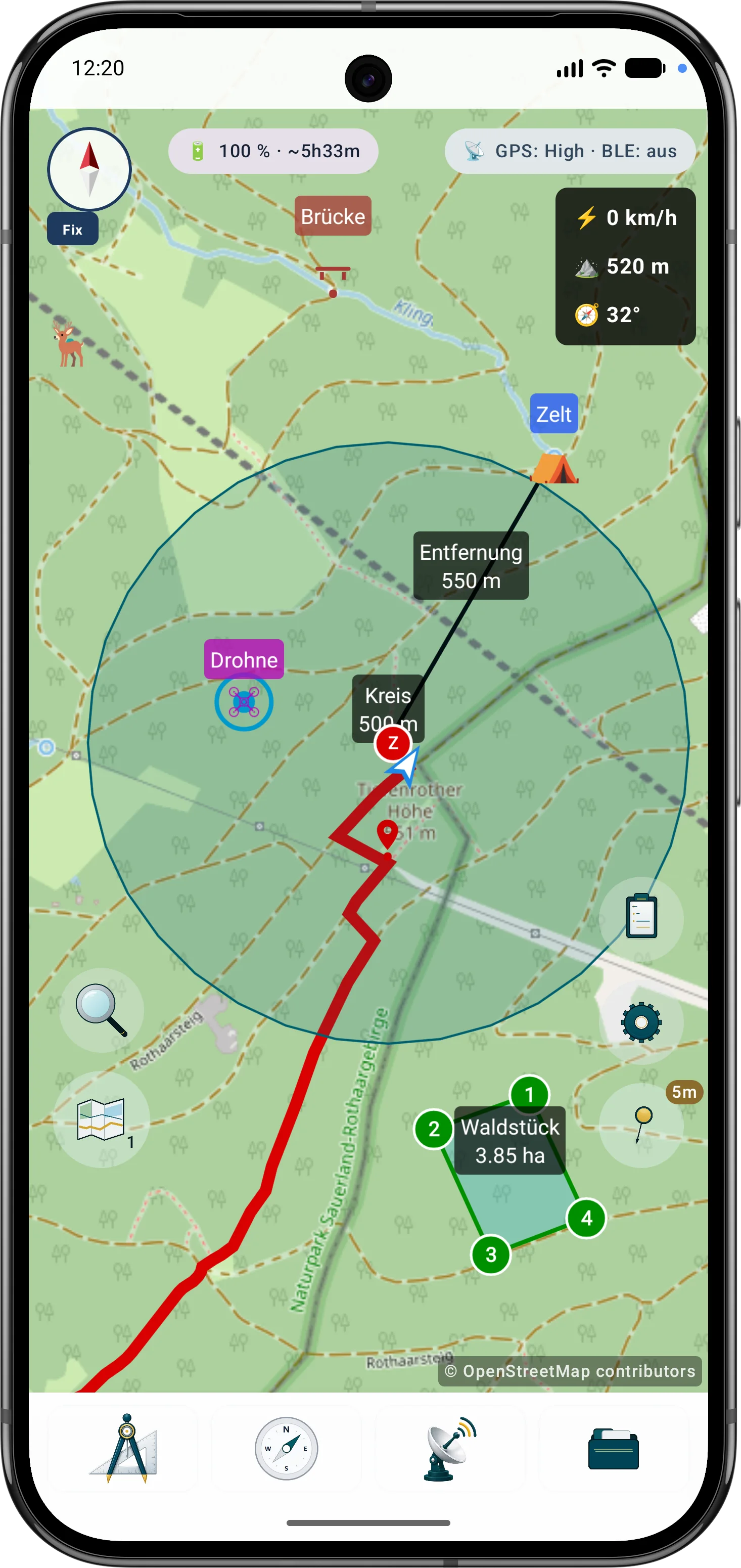
画面領域
主要なコントロールはマップ ビューから直接利用できます。
ツールバーは、ワークスペース上でマップ アクションを直接開始します。
設定メニューは、動作、表示、および作業プロファイルをグループ化します。
どのマップ レイヤーとデータ レイヤーを表示するかを制御します。
マップ ブラウザは、デバイス上のマップ ソースとローカル データを管理します。
オブジェクト ブラウザには、現在のプロジェクトの内容が表示されます。
検索は座標入力と POI 検索を組み合わせます。プロジェクトオブジェクトはオブジェクトブラウザーにあります。
ライブ メニューには、実行中の機能とクイック アクションが表示されます。
最初のステップ
初めて使用する際の最も重要な手順。
オフラインデータ
通信圏外で使う場合は、地図、POI、標高モデル、オーバーレイを先に適切な提供元から入手し、ArxSilex MapTools に取り込みます。
ソーシャルメディア
ArxSilex をフォロー
ArxSilex MapTools のニュース、スクリーンショット、動画、短い更新情報は、これらの外部チャンネルでも確認できます。
これらのリンクは外部プラットフォームを開きます。各プラットフォームの内容とデータ処理については、それぞれの運営者が責任を負います。 プライバシー · 法的通知