Local, not cloud
Imported offline data is stored in app-owned storage or at a file location you choose. There is no ArxSilex cloud sync for maps, POI, terrain or projects.
离线
提前准备地图、POI、高程模型、栅格叠加层和地图样式,让 ArxSilex MapTools 在没有移动网络时也能使用。
更新日期:2026 年 5 月 27 日
Data center
Offline use is more than one map file on the device. A useful field view depends on matching maps, POI, elevation models, overlays, profiles and map styles.
Imported offline data is stored in app-owned storage or at a file location you choose. There is no ArxSilex cloud sync for maps, POI, terrain or projects.
The app uses the Android file picker. You select files deliberately; ArxSilex MapTools does not request broad storage access to the whole device.
Smart Import analyzes files by content and suggests a target: base map, layer, raster overlay, POI, terrain, render theme or project.
The offline status shows whether map, POI, elevation data, active profile and map style are available for a position or whether online tiles would still be needed.
Map profiles combine map, active layers, terrain, POI display and map style. This lets you switch between outdoor, field and specialist views.
OpenAndroMaps, OpenStreetMap, your own GIS data, authority maps or commercial data may have their own license terms. The app does not automatically bundle external map data.
使用条款
ArxSilex MapTools uses these terms deliberately. They make it clear whether a file is used as a base map, editable geometry, image overlay or elevation data source.
| Term | Short definition | Examples |
|---|---|---|
| Maps | Base maps used as the main working view. | OpenStreetMap, OpenAndroMaps, offline .map, MBTiles as a base map |
| Vector layers | Additional object, line or polygon data above the map. The content consists of points, lines or areas and can often be displayed or evaluated individually. | GPX, KML, GeoJSON, Shapes, KML polygons, GeoJSON areas, GPX tracks as overlays |
| Raster overlays | Georeferenced image or tile data above the map. They are placed as a finished image surface and are not interpreted as individual objects. | GeoTIFF, MBTiles, image maps, aerial imagery, scanned maps, georeferenced plans |
| Elevation data / terrain | 数据来源 用于高程值和地形分析。它们并不是狭义上的可见地图,但会提供高度信息。 | HGT, DEM GeoTIFF, ASC, DTED |
| Map style | Rendering rules for vector maps. The style defines colors, symbols, paths, POIs, contour lines and other map elements. | OpenAndroMaps render theme, Elevate Theme |
| POI data | Search and display data for places and points of interest. | OpenAndroMaps .poi, custom POI files |
矢量图层包含独立几何对象。它们适用于规划数据、边界、搜索区域、路线、轨迹以及导入的项目信息。
栅格叠加层是覆盖在地图上方的成品图像面。它们适用于航拍图像、历史地图、扫描图或特殊地图视图。通常会调整透明度,使下方的底图仍然可见。
地图、矢量图层和栅格叠加层可以显示在地图中。高程数据通常由工具使用,例如点高程、高程剖面、山体阴影、等高线和可视范围。
来源
ArxSilex MapTools 不随附第三方地图数据。请从合适的数据提供方下载文件,检查许可证和格式,然后再有意导入应用。
| 数据类型 | 合适来源 | 说明 |
|---|---|---|
| 离线底图 | OpenAndroMaps General Maps OpenAndroMaps Countries and Regions Examples: Germany, Europe, USA, South and Middle America, Canada, Australia, New Zealand, Oceania, Asia and Middle East, Russia, Africa | For OpenAndroMaps, choose a world, country or regional map on the source page. Import ZIP files with Karte_Map in the name as Map/Custom; import POI_Normal...poi.zip as POI. |
| POI、图层和 OSM/GIS 数据 | BBBike Extracts Geofabrik 下载s | BBBike 和 Geofabrik 提供 OSM 摘取数据以及 GeoJSON、Shapefile 或 GeoPackage 等 GIS 格式。并非所有原始格式都能直接作为应用地图;请只导入受支持格式。 For Geofabrik, the relevant app format is usually .gpkg.zip when a GeoPackage download is available for the selected region. |
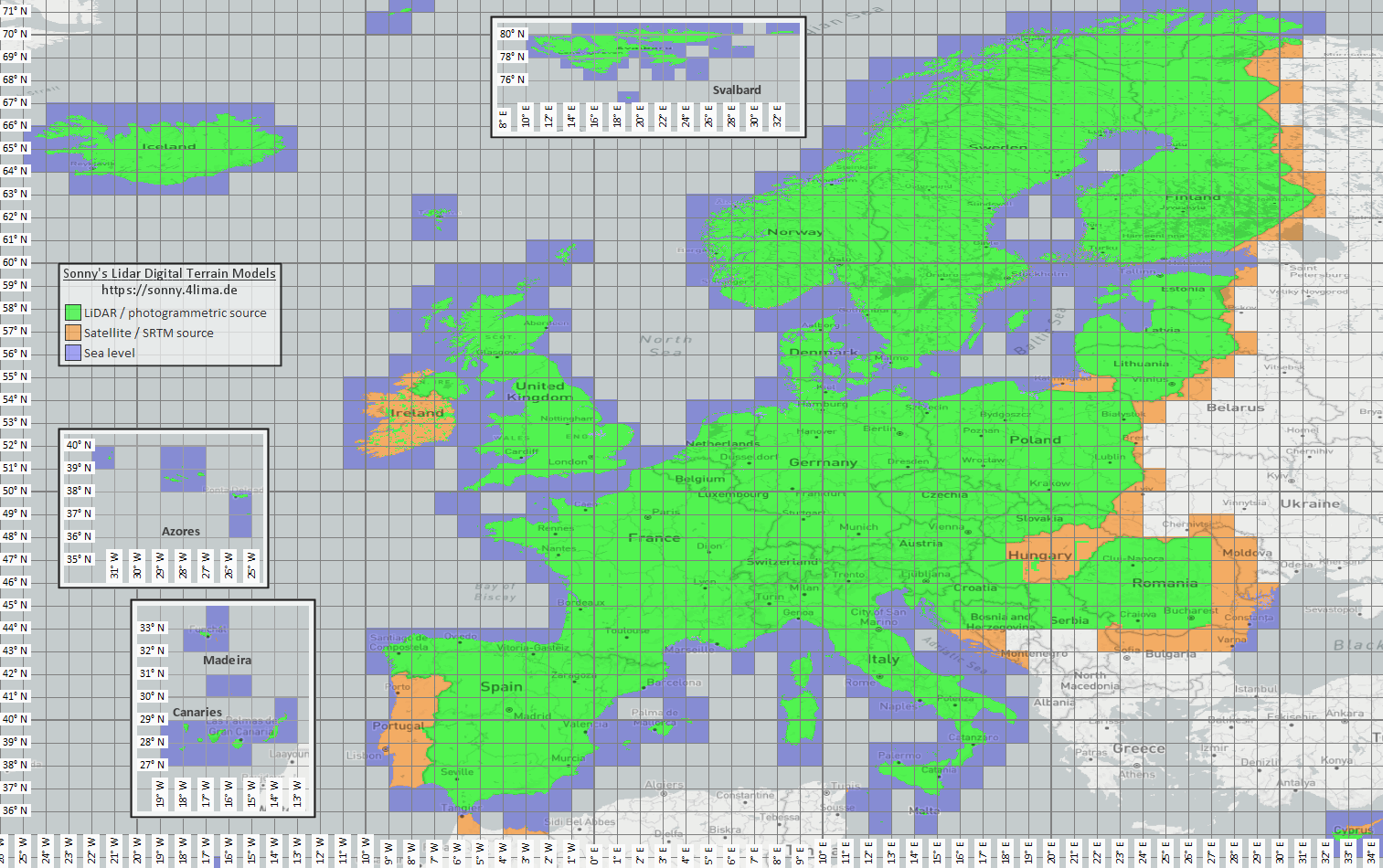
| 高程和地形数据 | Sonny LiDAR DTM Sonny DTM overview map USGS SRTM OpenTopography Copernicus Data Space | Sonny provides European digital terrain models as a source for elevation data. DTM 1" and DTM 3" are grids in arc seconds, roughly about 30 m and 90 m at the equator; DTM 20m and DTM 50m state the grid spacing directly in meters. Finer resolution needs more storage and import time. Use the overview map to find the matching coordinate/region, then select it on the source page. |
| 栅格叠加层和专用地图 | 开放数据门户 | 政府门户、开放数据门户或自己的 GIS 项目可提供 GeoTIFF、KML/KMZ、MBTiles 或 GeoPackage。导入前请检查地理配准和使用权。 |
| 渲染主题 | OpenAndroMaps Elevate | Use the OpenAndroMaps theme page for the Elevate mountain/hike theme. On Android, use the quick-install hint for the default maps app or download Elevate.zip and import it into ArxSilex MapTools as a theme. |
| 许可证和更新 | - | 数据来源可能要求署名、注册、使用限制或有自己的更新节奏。应用不运营这些提供方,也不能替代其许可证文本。 |
Formats
The app treats maps, 矢量图层, 栅格叠加层, POI data, elevation data and map styles separately. The same file format can have different targets depending on its content.
| Area | 支持ed data | Important for use |
|---|---|---|
| Offline base maps | Mapsforge .map, MBTiles .mbtiles, GeoPackage .gpkg | Mapsforge files, for example from OpenAndroMaps, are intended for vector maps. MBTiles and GeoPackage are used as tile containers or map catalog data. GeoTIFF is not a directly renderable base map here. |
| Vector layers and 栅格叠加层 | GPX, GeoJSON, KML, KMZ, LOC, JSON, GeoPackage, GeoTIFF, Shapefile ZIP | Vector and raster data can be prepared as additional layers. Visual GeoTIFF belongs to 栅格叠加层; DEM GeoTIFF belongs to elevation data. |
| POI and offline search | .poi, .db, .sqlite, .geojson, .json, .csv, .tsv, .txt, .zip | Searchable POI must be imported separately. An offline map file alone does not yet provide a complete local POI search. |
| Elevation data and terrain analysis | SRTM .hgt, DEM GeoTIFF .tif/.tiff/.geotiff, ESRI ASCII Grid .asc, DTED .dt0/.dt1/.dt2, elevation data ZIP | Used for point elevation, route elevation profiles, hillshade, contours and viewrange. GeoPackage DEM is not intended for these elevation queries. |
| Map styles | Compatible Mapsforge/Elevate-like theme ZIP files | Map and map style remain separate. External themes must be obtained separately and follow their own license. |
| Projects and exchange data | ArxSilex projects, GPX, KML, KMZ, GeoJSON, CSV, PDF, ZIP | Project and exchange formats can be stored or shared offline. Shared files leave the app only through your action. |
Preparation
Check which region is really needed. Smaller, suitable datasets start faster and save battery and storage.
Import a Mapsforge .map file, MBTiles or a suitable GeoPackage. Then activate it in the map profile.
If you want offline search, import POI data in addition to the map and check categories, size and indexing.
Import HGT, DEM GeoTIFF, ASC or DTED for elevation profiles, hillshade, contours and viewrange in the area.
Use offline status, Layers & Visibility and map profiles before entering an area without coverage.
Limits
离线数据 is reliable as long as coverage, format and quality fit. Some features intentionally depend on external data or user action.
The app displays and analyzes geodata, but it does not calculate automatic turn-by-turn routes along roads or trails like a routing service.
Elevation data and POI only work where the imported files actually cover the area.
Google or OSM online maps can still request tiles from external providers. Choose imported maps and data for local use.
Large maps, GeoTIFFs, elevation data archives and POI databases need storage and can take time to import or index.
Imported maps, 矢量图层, 栅格叠加层, POI data, elevation data and map styles can be removed in the relevant data areas. App data can also be cleared through Android.
ArxSilex MapTools
Import/export describes exchange formats in more detail. 权限 and privacy explain when files, location, online maps or third parties matter.