Local, not cloud
Imported offline data is stored in app-owned storage or at a file location you choose. There is no ArxSilex cloud sync for maps, POI, terrain or projects.
Offline
Förbered kartor, POI, höjdmodeller, rasterlager och kartstilar så att ArxSilex MapTools fungerar utan mobiltäckning.
Senast uppdaterad: 27 maj 2026
Data center
Offline use is more than one map file on the device. A useful field view depends on matching maps, POI, elevation models, overlays, profiles and map styles.
Imported offline data is stored in app-owned storage or at a file location you choose. There is no ArxSilex cloud sync for maps, POI, terrain or projects.
The app uses the Android file picker. You select files deliberately; ArxSilex MapTools does not request broad storage access to the whole device.
Smart Import analyzes files by content and suggests a target: base map, layer, raster overlay, POI, terrain, render theme or project.
The offline status shows whether map, POI, elevation data, active profile and map style are available for a position or whether online tiles would still be needed.
Map profiles combine map, active layers, terrain, POI display and map style. This lets you switch between outdoor, field and specialist views.
OpenAndroMaps, OpenStreetMap, your own GIS data, authority maps or commercial data may have their own license terms. The app does not automatically bundle external map data.
Användarvillkor
ArxSilex MapTools uses these terms deliberately. They make it clear whether a file is used as a base map, editable geometry, image overlay or elevation data source.
| Term | Short definition | Examples |
|---|---|---|
| Maps | Base maps used as the main working view. | OpenStreetMap, OpenAndroMaps, offline .map, MBTiles as a base map |
| Vector layers | Additional object, line or polygon data above the map. The content consists of points, lines or areas and can often be displayed or evaluated individually. | GPX, KML, GeoJSON, Shapes, KML polygons, GeoJSON areas, GPX tracks as overlays |
| Raster overlays | Georeferenced image or tile data above the map. They are placed as a finished image surface and are not interpreted as individual objects. | GeoTIFF, MBTiles, image maps, aerial imagery, scanned maps, georeferenced plans |
| Elevation data / terrain | Datakällor för höjdvärden och terränganalys. De är inte en synlig karta i strikt mening, men de ger höjdinformation. | HGT, DEM GeoTIFF, ASC, DTED |
| Map style | Rendering rules for vector maps. The style defines colors, symbols, paths, POIs, contour lines and other map elements. | OpenAndroMaps render theme, Elevate Theme |
| POI data | Search and display data for places and points of interest. | OpenAndroMaps .poi, custom POI files |
Vektorlager innehåller individuella geometrier. De är användbara för planeringsdata, gränser, sökområden, rutter, spår och importerad projektinformation.
Rasteröverlägg är färdiga bildytor ovanpå kartan. De är användbara för flygbilder, historiska kartor, skanningar eller särskilda kartvyer. Opaciteten justeras ofta så att baskartan fortfarande syns under.
Kartor, vektorlager och rasteröverlägg kan visas på kartan. Höjddata används vanligtvis av verktyg: punkthöjd, höjdprofil, hillshade, höjdkurvor och synfält.
Källor
ArxSilex MapTools levererar inte kartdata från tredje part. Ladda ned filer från rätt leverantör, kontrollera licens och format och importera dem medvetet i appen.
| Datatyp | Lämpliga källor | Kommentarer |
|---|---|---|
| Offline-baskartor | OpenAndroMaps General Maps OpenAndroMaps Countries and Regions Examples: Germany, Europe, USA, South and Middle America, Canada, Australia, New Zealand, Oceania, Asia and Middle East, Russia, Africa | For OpenAndroMaps, choose a world, country or regional map on the source page. Import ZIP files with Karte_Map in the name as Map/Custom; import POI_Normal...poi.zip as POI. |
| POI, lager och OSM/GIS-data | BBBike Extracts Geofabrik Ladda ners | BBBike och Geofabrik erbjuder OSM-utdrag och GIS-format som GeoJSON, Shapefile eller GeoPackage. Alla råformat är inte direkt appkartor; importera bara format som stöds. For Geofabrik, the relevant app format is usually .gpkg.zip when a GeoPackage download is available for the selected region. |
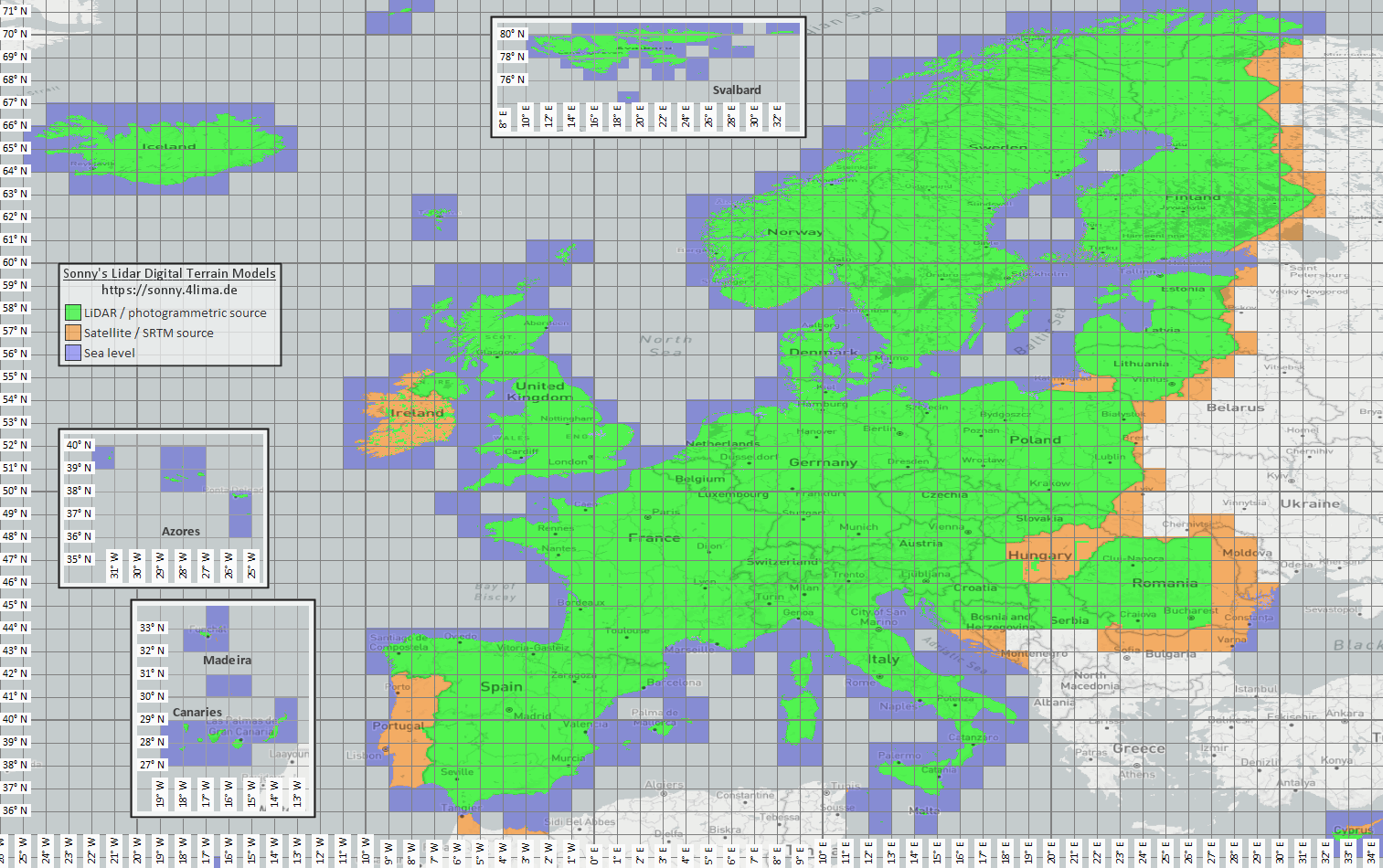
| Höjd- och terrängdata | Sonny LiDAR DTM Sonny DTM overview map USGS SRTM OpenTopography Copernicus Data Space | Sonny provides European digital terrain models as a source for elevation data. DTM 1" and DTM 3" are grids in arc seconds, roughly about 30 m and 90 m at the equator; DTM 20m and DTM 50m state the grid spacing directly in meters. Finer resolution needs more storage and import time. Use the overview map to find the matching coordinate/region, then select it on the source page. |
| Rasterlager och specialkartor | Öppna dataportaler | Myndighetsportaler, öppna dataportaler eller egna GIS-projekt kan tillhandahålla GeoTIFF, KML/KMZ, MBTiles eller GeoPackage. Kontrollera georeferens och användningsrätt före import. |
| Render-teman | OpenAndroMaps Elevate | Use the OpenAndroMaps theme page for the Elevate mountain/hike theme. On Android, use the quick-install hint for the default maps app or download Elevate.zip and import it into ArxSilex MapTools as a theme. |
| Licens och aktualitet | - | Källor kan kräva attribution, registrering, användningsgränser eller ha egna uppdateringsrytmer. Appen driver inte dessa leverantörer och ersätter inte deras licenser. |
Formats
The app treats maps, vektorlager, rasteröverlägg, POI data, elevation data and map styles separately. The same file format can have different targets depending on its content.
| Område | Supported data | Important for use |
|---|---|---|
| Offline base maps | Mapsforge .map, MBTiles .mbtiles, GeoPackage .gpkg | Mapsforge files, for example from OpenAndroMaps, are intended for vector maps. MBTiles and GeoPackage are used as tile containers or map catalog data. GeoTIFF is not a directly renderable base map here. |
| Vector layers and rasteröverlägg | GPX, GeoJSON, KML, KMZ, LOC, JSON, GeoPackage, GeoTIFF, Shapefile ZIP | Vector and raster data can be prepared as additional layers. Visual GeoTIFF belongs to rasteröverlägg; DEM GeoTIFF belongs to elevation data. |
| POI and offline search | .poi, .db, .sqlite, .geojson, .json, .csv, .tsv, .txt, .zip | Searchable POI must be imported separately. An offline map file alone does not yet provide a complete local POI search. |
| Elevation data and terrain analysis | SRTM .hgt, DEM GeoTIFF .tif/.tiff/.geotiff, ESRI ASCII Grid .asc, DTED .dt0/.dt1/.dt2, elevation data ZIP | Used for point elevation, route elevation profiles, hillshade, contours and viewrange. GeoPackage DEM is not intended for these elevation queries. |
| Map styles | Compatible Mapsforge/Elevate-like theme ZIP files | Map and map style remain separate. External themes must be obtained separately and follow their own license. |
| Projects and exchange data | ArxSilex projects, GPX, KML, KMZ, GeoJSON, CSV, PDF, ZIP | Project and exchange formats can be stored or shared offline. Shared files leave the app only through your action. |
Preparation
Check which region is really needed. Smaller, suitable datasets start faster and save battery and storage.
Import a Mapsforge .map file, MBTiles or a suitable GeoPackage. Then activate it in the map profile.
If you want offline search, import POI data in addition to the map and check categories, size and indexing.
Import HGT, DEM GeoTIFF, ASC or DTED for elevation profiles, hillshade, contours and viewrange in the area.
Use offline status, Layers & Visibility and map profiles before entering an area without coverage.
Limits
Offlinedata is reliable as long as coverage, format and quality fit. Some features intentionally depend on external data or user action.
The app displays and analyzes geodata, but it does not calculate automatic turn-by-turn routes along roads or trails like a routing service.
Elevation data and POI only work where the imported files actually cover the area.
Google or OSM online maps can still request tiles from external providers. Choose imported maps and data for local use.
Large maps, GeoTIFFs, elevation data archives and POI databases need storage and can take time to import or index.
Imported maps, vektorlager, rasteröverlägg, POI data, elevation data and map styles can be removed in the relevant data areas. App data can also be cleared through Android.
ArxSilex MapTools
Import/export describes exchange formats in more detail. Behörigheter and privacy explain when files, location, online maps or third parties matter.