
البداية والاتجاه
يمكنك المشي من البداية إلى النهاية أو العكس. لا تحصل الطرق الدائرية على توصية تلقائية؛ الاتجاه هو اختيارك.
يمارس
استخدم المسار والمسار وملف تعريف الارتفاع والتضاريس وتصدير التقارير معًا.
سير العمل
استخدم هذه الخطوات لدمج الخرائط والبيانات والأدوات الخاصة بالمهمة.
تسجيل المسارات
يقوم تسجيل المسار بتخزين الطوابع الزمنية ومدة الجولة والتوقف المؤقت كمقاطع مسار ومواضع الإيقاف المؤقت ودقة GPS. تعرض نقاط التتبع الأوقات الحالية والتوقفات المؤقتة وبيانات الجودة في ورقة المعلومات، بينما يحافظ شريط التتبع المدمج على حالة التسجيل مرئية دون تغطية الخريطة أو القائمة أو التنقل بشكل غير ضروري.
تحديث
يمكن تحسين نقاط وأجزاء الطريق لاحقًا. تساعد السمت والمسافات وزوايا الاتجاه في تصحيح الخط المخطط بدقة على الخريطة.
اتبع الطريق
عند اتباع مسار ما، فإنك تختار عمدًا المسار واتجاه المشي ووضع التوجيه. لا يغير التطبيق المسار المخزن؛ يستخدم الهندسة الموجودة.
يمكنك المشي من البداية إلى النهاية أو العكس. لا تحصل الطرق الدائرية على توصية تلقائية؛ الاتجاه هو اختيارك.
اختر مقطع المسار الذي توجد عليه. تُقاس المسافة من بداية المسار. تعرض المسافة والتعليمات آخر موضع مؤكد.
يستمد التطبيق تغييرات الاتجاه ذات الصلة من خط الطريق ويعرض فقط الإشارة المهمة التالية مع السهم والمسافة والوقت المقدر الاختياري.
في الوضع الهادئ، يعرض التطبيق فقط ما إذا كنت على الطريق أم لا. إذا غادرت الممر بوضوح، فيمكن التحذير بالصوت أو الاهتزاز أو التنبيه الصامت.
يمكن إيقاف متابعة المسار مؤقتًا ومقاطعته اليوم والاستمرار فيه لاحقًا. يتم تخزين الجلسات النشطة داخليًا، لكن لا يتم تصديرها مع المشاريع.
تحليل
عند إنشاء طريق أو منطقة، تكون النقطة المؤكدة الأولى مرئية على الفور.
تستخدم قيم الصعود والهبوط المباشرة والنهائية مرشح منحنى الارتفاع نفسه، القائم على المسافة والمقاطع. لا تسبب الارتفاعات غير الموثوقة والفجوات غير المحسومة زيادة مصطنعة في الارتفاع؛ وتُميّز القيمة المباشرة المتغيرة بالرمز ≈.
تخطيط الطريق
تظل نقرات الخريطة المباشرة متاحة في أداة المسار. اضغط على أيقونة التقاطع، وحرك الخريطة أسفل المركز الثابت واضغط على علامة الزائد لإضافة نقاط متتالية. تظل الإحداثيات والمسافة من النقطة السابقة مرئية. لا يزال وضع Free أو Follow Way المحدد مطبقًا. يغلق X أو Back علامة التقاطع فقط ويحافظ على مسودة المسار. يعمل هذا على خرائط جوجل وVTM.
كيف يتم إنتاج توقعات ضوء النهار
تخطيط الطريق
في ضبط المسار، تظل المسارات قابلة للتحرير بدقة بعد تكبير الخريطة أو تحريكها أو تدويرها، ويمكن الاستمرار في أي من الطرفين.
تمديد في البداية على اليسار و تمديد في النهاية على اليمين. يمكنك إضافة عدة نقاط بالتسلسل؛ يتم تحديث بداية المسار المخزن ووجهته بشكل صحيح.
يتطلب وضع التخطيط هذا خريطة متجهة محلية نشطة ومتوافقة Mapsforge مع بيانات المسار القابلة للاستخدام. إذا لم يتوفر مسار مناسب، فيمكن تخزين المقطع فقط كاتصال مباشر أو مجاني.
يمكن وضع علامة على الجزء الحر المخزن بـ مسار البحث مرة أخرى لإعادة الحساب عند الحفظ. تظل الأجزاء الأخرى المرسومة بشكل حر دون تغيير.
لا يسبب المرشحون الداخليون المكافئون هندسيًا تحذيرًا من الغموض. غير مؤكد محجوز لدورات المسار التنافسية الحقيقية؛ يتم تحديد القطاعات غير المتطابقة على أنها اتصالات مباشرة.
تخطيط الطريق والملاحة
تستخدم عملية البحث عن المسار المحلي ومعاينة المسار والتنبؤ بضوء النهار نفس مسار المسار المقدم.
قد تكون المسافة بين نقطتي الطريق المحددتين تصل إلى 3 كيلومترات كما يطير الغراب. يعد هذا حدًا للتحقق لكل قسم، وليس ضمانًا بأن بيانات Mapsforge النشطة تحتوي على مسار متصل. فقط بعد فشل البحث الصارم عن المسار، يمكن للتطبيق سد فجوات صغيرة تصل إلى 25 مترًا بين مسار مفتوح متوافق ينتهي بنفس الطريق أو مرجع مسار المشي لمسافات طويلة؛ تم وضع علامة على هذا القسم غير مؤكد.
معاينة على الخريطة يناسب المركز ويقوم بتكبير المربع المحيط بالمسار الكامل مع الحفاظ على جميع المدخلات. أثناء الملاحة، تحدد العلامات المؤقتة بداية الشفق والليل المدني. يتم تحديثها كل 15 دقيقة تقريبًا أو بعد مسافة مناسبة للوتيرة وتختفي عند انتهاء التنقل. إن مهلة التحذير البالغة 0 دقيقة تعني تحذيرًا عند الانتقال ذي الصلة.
حفظ بأمان
بعد التحرير أو إعادة التخطيط العادي بين A وB، يمكنك اختيار ما سيتم حفظه بشكل صريح.
يتلقى المسار الحالي الدورة التدريبية المحررة. يظل معرفه ومجموعته والمراجع الموجودة سليمة. الكتابة ذرية ويتم التحقق منها بعد ذلك.
يقوم مربع حوار التسمية بإنشاء مسار مستقل بمعرف جديد. يتم وضع المتغير بجوار مصدره ويظل المسار الأصلي بدون تغيير تمامًا.
تم تعطيل الحفظ أثناء تشغيل عملية إعادة الحساب. إذا فشلت الكتابة أو تمت مقاطعة التطبيق، فستظل المسودة متاحة ولن تحل الحالة غير المكتملة محل النسخة الأصلية أبدًا.
تنظيم الطرق
يمكن تقسيم المسارات المخططة في MapTools إلى مراحل، أو دمجها تحت سيطرتك أو إعادة تخطيط قسم واحد في كل مرة. تظل النسخ الأصلية سليمة، ويتم حفظ العمل المتوسط، وتتطلب القرارات التي تغير المسار تأكيدًا.
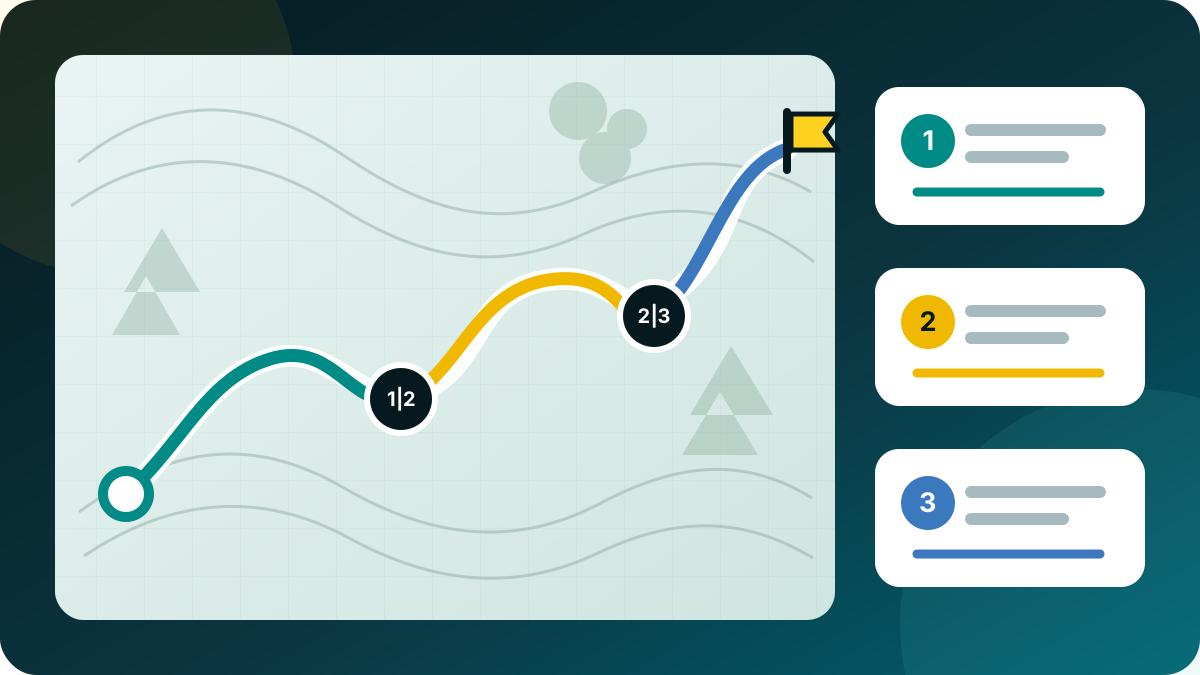

في ضبط المسار، قم بتمييز عدة نقاط تحكم كنقاط تقسيم وقم بتحرير أسماء المراحل المقترحة. يتم حفظ جميع المراحل معًا بينما يظل المسار المصدر دون تغيير.
حدد مسارين مخططين على الأقل في مستعرض الكائنات وافتحهما دمج الطرق. قم بتحريك الأجزاء المقترحة لأعلى أو لأسفل وعكس أي جزء بشكل صريح عند الحاجة.
يختار مباشر أو اتبع المسار لكل فجوة حقيقية. يستخدم مسار المتابعة خريطة متجهة محلية نشطة لـ Mapsforge. إذا فشل العثور على المسار، فلن يتحول MapTools أبدًا بصمت إلى خط مستقيم؛ يتطلب هذا الإجراء الاحتياطي تأكيدًا منفصلاً.
حدد نقطتين على أنهما A وB، ثم قم بإعادة حساب القسم الموجود بينهما فقط أو قم بتوصيله مباشرة بعد التأكيد. يمكن لنقطة مفضلة إضافية توجيه التحويلة بينما يظل باقي المسار دون تغيير هندسيًا.
تفصل القائمة "إيقاف" فترة توقف قصيرة، تعليق لوقت لاحق والتوقف النهائي. تعليق تقدم المخازن ونقطة الاستمرار المحددة قبل انتهاء خدمة التنقل. يبدأ GPS مرة أخرى فقط بعد ذلك يكمل. احفظ الباقي كمسار جديد يبقى إجراء منفصلا.
تتم كتابة التعديلات كمسودة قابلة للاستئناف مع حالة الحفظ أو الحفظ أو الخطأ. بعد إيقاف تشغيل الخلفية أو بطارية فارغة، تتم استعادة آخر حالة تم التحقق منها؛ الكتابة الفاشلة لا تؤدي إلى استبدال النص الأصلي. تظل النتائج هي المسارات القياسية التي يمكن تبادلها من خلال ملفات المشروع، GPX، KML وGeoJSON.
لا يتم إعادة بناء المسارات المسجلة مثل مسارات التخطيط. استخدم كطريق جديد ينشئ نسخة قابلة للتحرير؛ وضع المسار إزالة النقاط يستمر في حفظ نسخة المسار التي تم تنظيفها فقط.
جودة التسجيل
أثناء تنشيط تسجيل المسار، يستخدم MapTools GNSS الداخلي للمسار المسجل. قد تظل مواقع الشبكة والمواقع السلبية وآخر معروفة تساعد في تحديد موضع الخريطة، ولكن لا يتم دمجها بصمت في المسار.
يتم فحص تسلسل الموضع المشتبه به لفترة وجيزة دون استبدال آخر نقطة موثوقة. عودة تُكمل الطريق هناك؛ منطقة جديدة مؤكدة أو فجوة استقبال أطول تبدأ شريحة جديدة. المسافة والارتفاع والصادرات لا تخلق رابطًا مصطنعًا عبر تلك الفجوة. لا يتم تخزين المواقف الأولية المرفوضة؛ تظهر العدادات المدمجة فقط في تفاصيل المسار. يؤدي هذا إلى تقليل القفزات الشائعة ولكن لا يضمن اكتشاف كل خطأ في GNSS.
تسجيل المسارات
تحتوي ورقة التسجيل على وضع نشط واحد بالضبط: تلقائي، أو دقة عالية، أو ملاحة، أو متوازن، أو توفير الطاقة، أو مخصص.
تلقائي: بداية قصيرة عالية الدقة، ومتوازنة عادةً، ونظام ملاحة للتوجيه النشط أو حركة أسرع ومستقرة، وتوفير الطاقة للبيئة أو البطارية بنسبة 20% أو أقل؛ العائد على 25%. البرد يحذر فقط.
مخصص: إما الوقت (1، 2، 3، 5، 10، 15، 30 ثانية؛ 1، 2، 5، 10 دقيقة) أو المسافة (3، 5، 10، 20، 50، 100 م). تظل حماية الجودة والتوقف نشطة. تنطبق التغييرات على الإصلاح التالي القابل للاستخدام؛ تحتفظ الخدمة والمجلة بالإعدادات في الخلفية وبعد إعادة تشغيل العملية.
| حساب تعريفي | وقت | حركة | دقة |
|---|---|---|---|
| دقة عالية | 1 ثانية | 3 م | ما يصل إلى 10 م |
| ملاحة | 2 ثانية | 3 م | ما يصل إلى 20 م |
| متوازن | 5 ثانية | 5 م | ما يصل إلى 25 م |
| توفير الطاقة | 15 ثانية | 10 م | ما يصل إلى 40 م |
قواعد MapTools، غير مضمونة مرات GNSS. توفير الطاقة ليس مزود طاقة منخفضة Android.
المراجعة والمشاركة
أنشئ خريطة قابلة للقراءة تحتوي على إحصائيات ذات صلة من المسارات المخططة أو المسارات المسجلة، واحفظها بتنسيق PNG، واستخدمها دون مطالبة المشاهدين بتثبيت تطبيق.
يبقى الوقت المنقضي والوقت باستثناء التوقفات وتوقفات المستخدم الصريحة منفصلة. يوضح متوسط السرعة ووتيرة السير الأساس الزمني المستخدم؛ ولا تُحسب فجوات GPS التقنية كتوقفات. يُقلل تنعيم السرعة القصوى أثر القفزات المنفردة في الموقع.
تتضمن Free ملخصات بالخرائط والإحصاءات، ومنحنيات ارتفاع المسارات المخططة المتاحة. تتطلب منحنيات ارتفاع المسارات المسجلة وتصدير PNG نسخة Pro. اختر OSM مع نسب المصدر أو دون خلفية؛ ولا تُصدّر خرائط Google أو الخرائط ذات الأذونات غير الواضحة. يظل تصدير منحنيات الارتفاع كملفات PDF منفصلة متاحًا.
تعرض المسارات المسافة والوقت الكلي ووقت الحركة المقدرين والسرعة المخططة والتوقفات والارتفاع. يُوضح نموذج الوقت: مراعاة الانحدار في نموذج المشي، وسرعة ثابتة فيما عداه. تعرض المسارات المسجلة أوقات التسجيل التي تدعمها البيانات؛ ولا تُستبدل الأوقات أو التوقفات المجهولة بصفر. إنهاء ملاحة المسار لا ينشئ مسارًا مسجلًا.
اختر المسار المسجل كاملًا، أو قصّ طرفيه، أو البيانات فقط. يمكن ضبط مسافة القص؛ وتشير هندسة المسار والإحصاءات والارتفاع إلى الجزء المتبقي. لا يُعاد استخدام المسار الكامل إذا كان قصيرًا جدًا. يبقى محتوى الخانات الإضافي معطلًا أثناء القص؛ ويبقى الأصل دون تغيير. القص لا يضمن إخفاء الهوية.
الخريطة يسارًا والبيانات يمينًا، أو الخريطة أعلى والبيانات أسفل، أو صورتا PNG منفصلتان للخريطة والبيانات: لا تتضمن النتيجة كتلة عنوان. يُبقي خط المسار الرفيع ومنحنى الارتفاع ذو المحاور المسماة وخطوط الشبكة الرئيسية والفرعية التفاصيل مقروءة. تبقى الإحصاءات خارج الخريطة. ويمكن تصدير أي صورة من الزوج منفردةً.
حرّك الخريطة وكبّرها ودوّرها داخل إطار ثابت؛ واختر الشمال لأعلى أو ملاءمة المسار. تدور التسميات النقطية أيضًا. اختر الإحصاءات والوتيرة والتاريخ والمنحنى واللون وسُمك الخط والنمط المحايد أو الدافئ؛ تُحفظ آخر الإعدادات. للويب: 2000 px؛ كبير: 3000 px؛ التفاصيل حسب المصدر. يحدد «حفظ باسم» الوجهة، أو مجلدًا واحدًا لزوج الصور. محتوى الخانات المدعوم اختياري؛ وتُذكر الأجزاء المستبعدة.
تصحيح المسار
يمكن تنظيف التسجيلات المحفوظة بدقة دون تحويلها إلى مسار مخطط.
ضمن تنظيف المسار المسجل → إزالة النقاط، حدد نقطة خام داخلية واحدة أو قسمًا مستمرًا مباشرةً في عرض المسار، باستخدام شريط تمرير النطاق أو من قائمة النقاط الكاملة. تعرض المعاينة الدورة التدريبية التي تمت إزالتها والاتصال المباشر الجديد.
يتم تقديم مواقع الشبكة والمواقع السلبية والمدمجة بالإضافة إلى القفزات الكبيرة المعزولة للخارج والعودة كمرشحين. MapTools لا يقوم بإزالتها تلقائيًا أبدًا؛ يتخذ المستخدم القرار.
يتم حفظ عملية التنظيف كنسخة مصححة جديدة فقط. يتم الاحتفاظ بالأصل والطوابع الزمنية وأحداث التسجيل وحدود النشاط وفجوات المقطع الحقيقية والوسائط. يتم دعم المسارات الأقدم بدون علامات البداية/النهاية أيضًا؛ يظل محرر الهندسة العامة محجوزًا للطرق المخططة.
دليل خطوة بخطوة
افتح طريقًا موجودًا، وأضف نقطة تحكم مفضلة، وحدد الحدود على أنها A وB، واستبدل القسم الموجود بينهما فقط. بقية المسار يبقى دون تغيير.
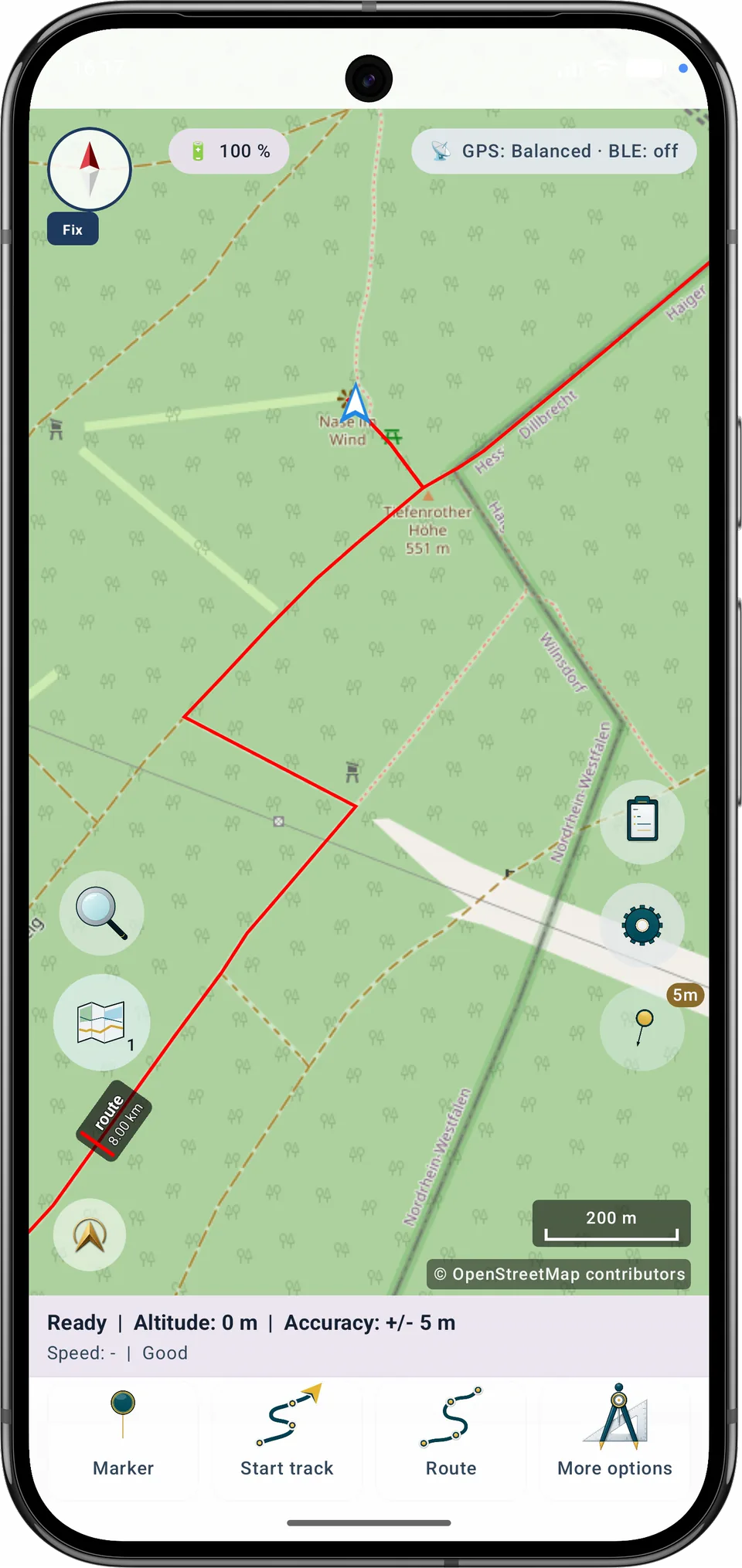
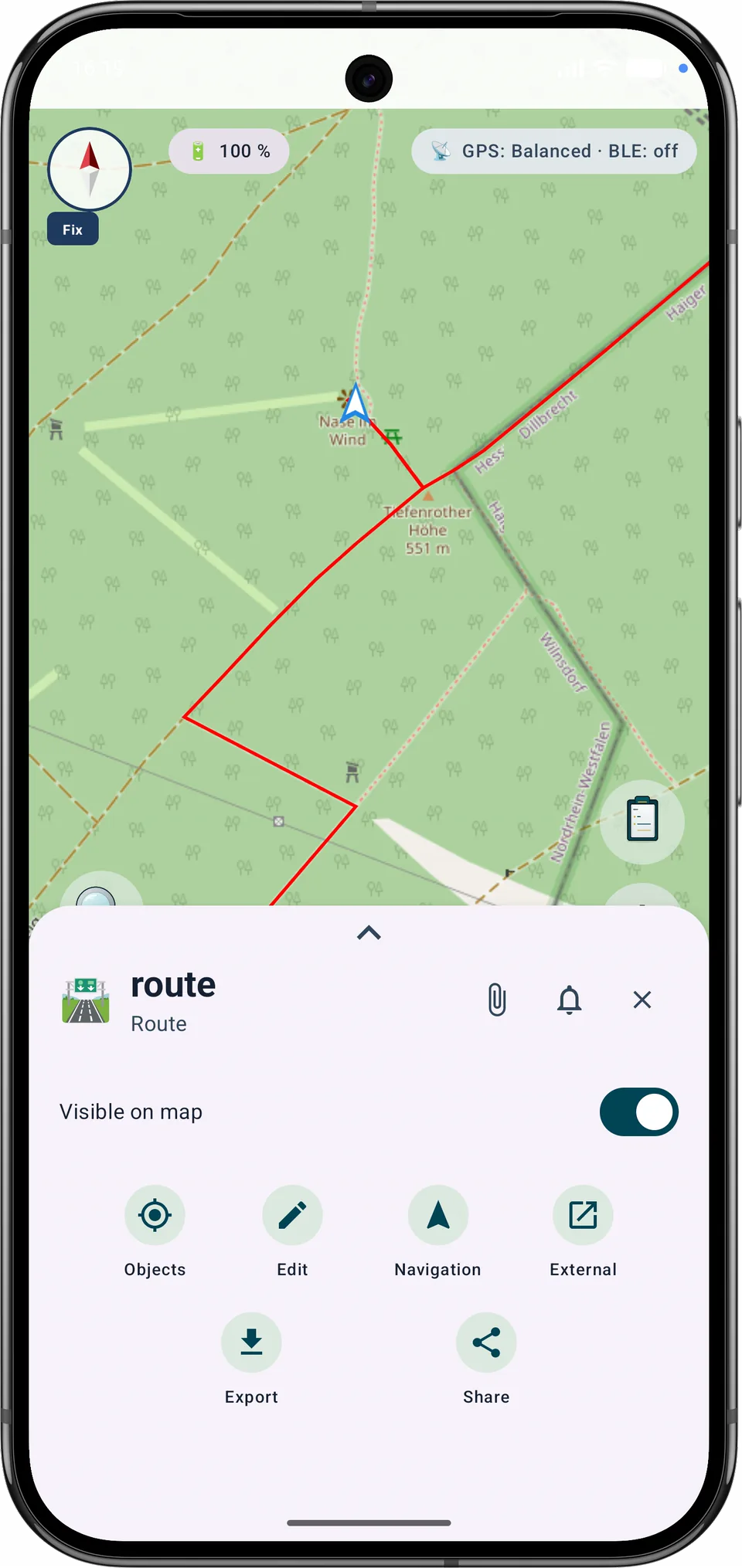
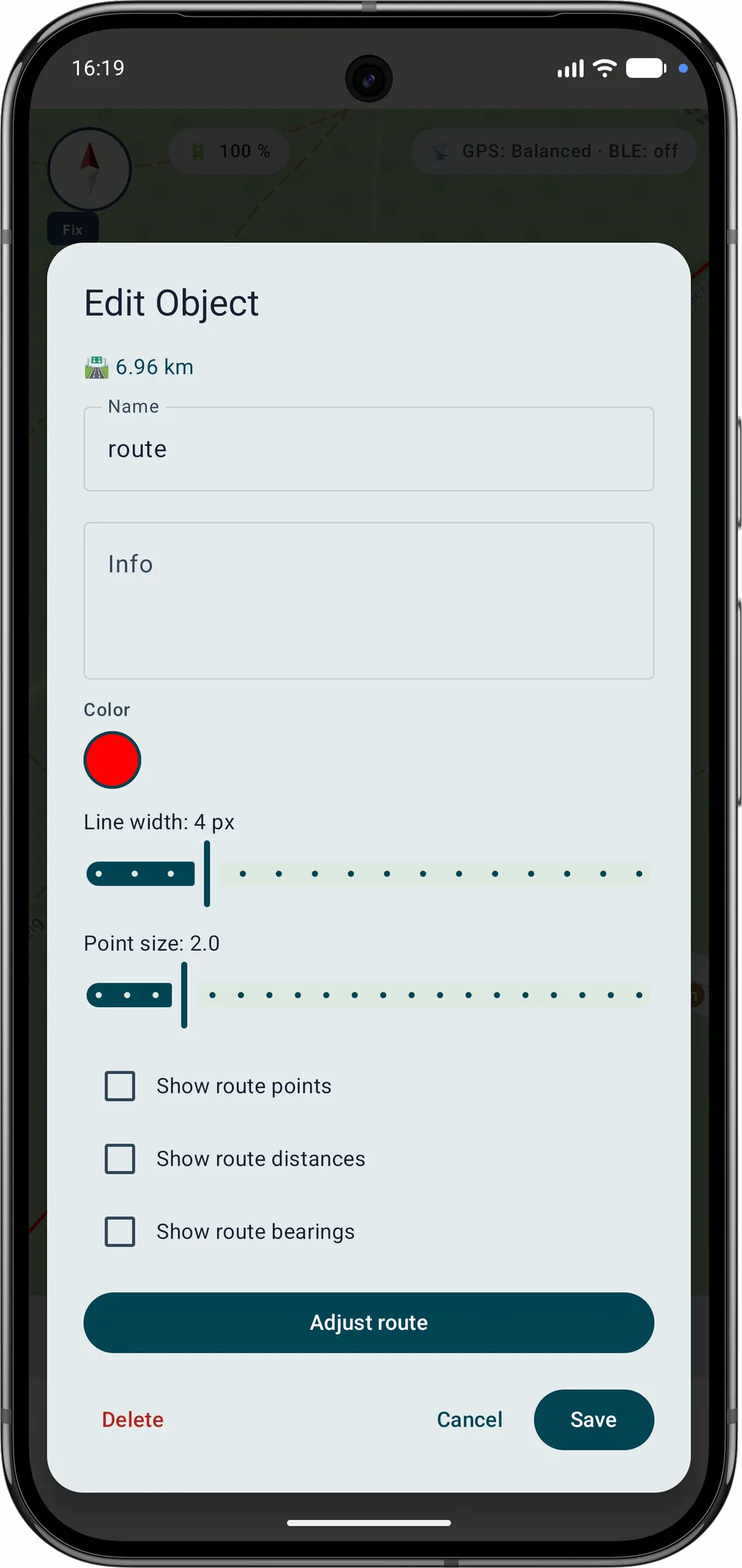
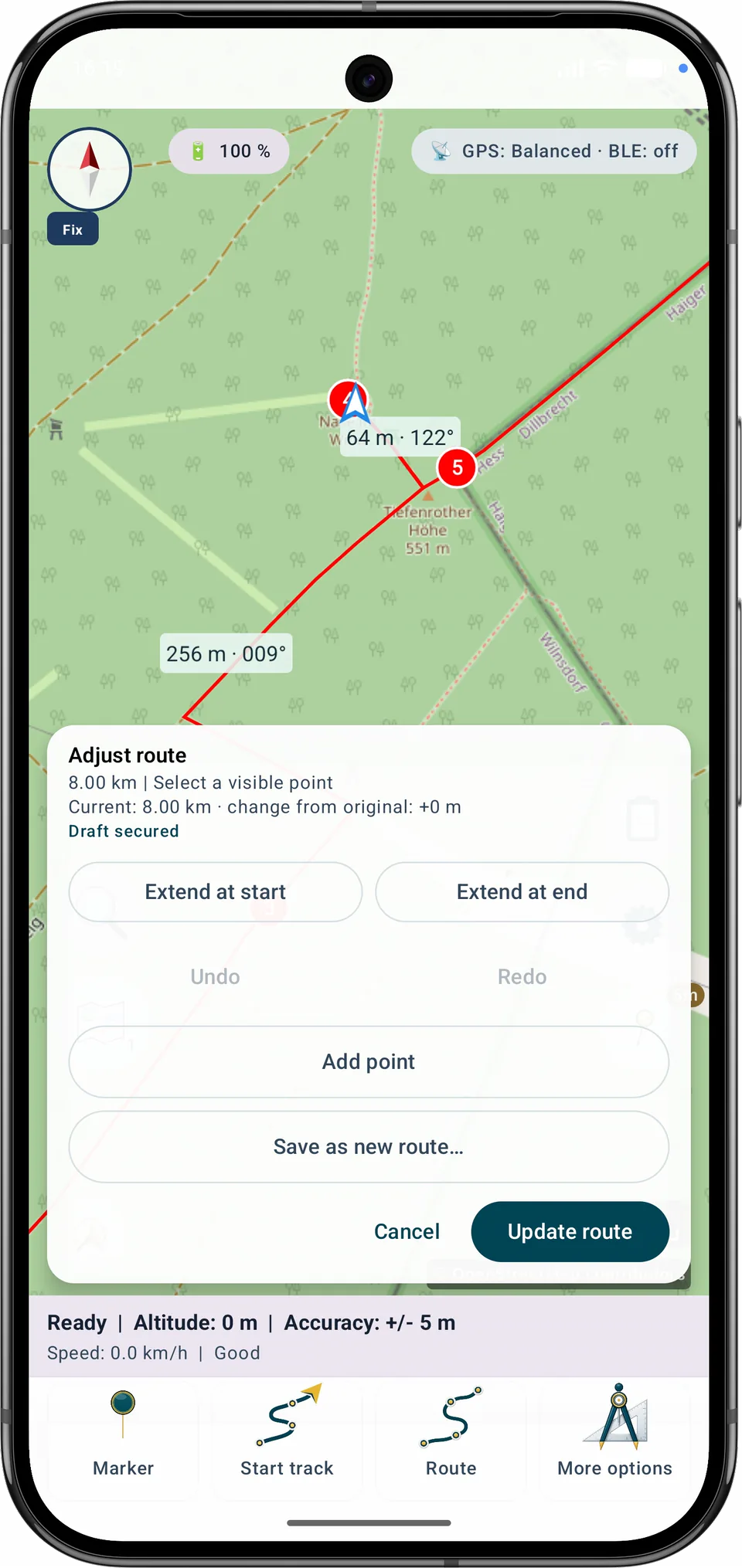
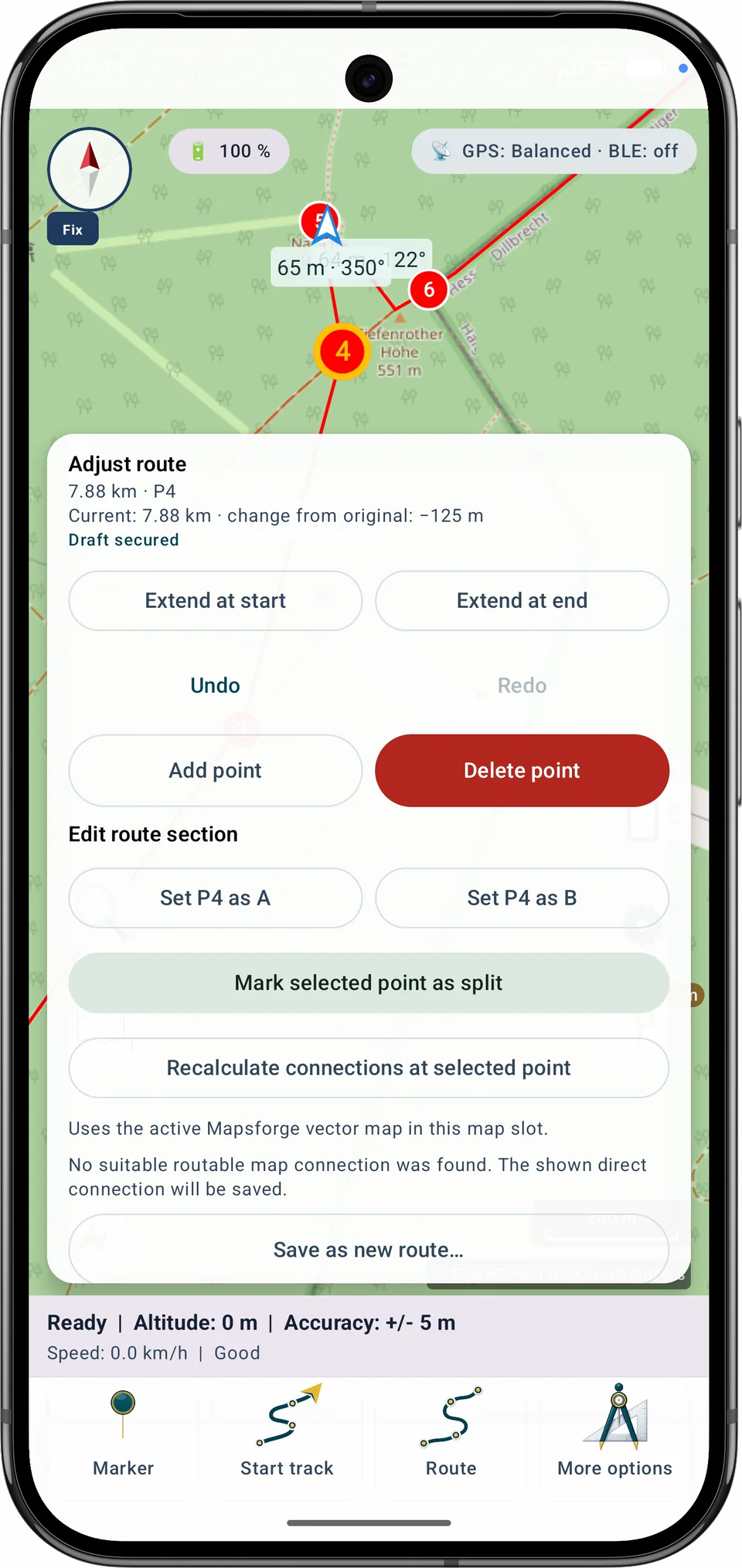
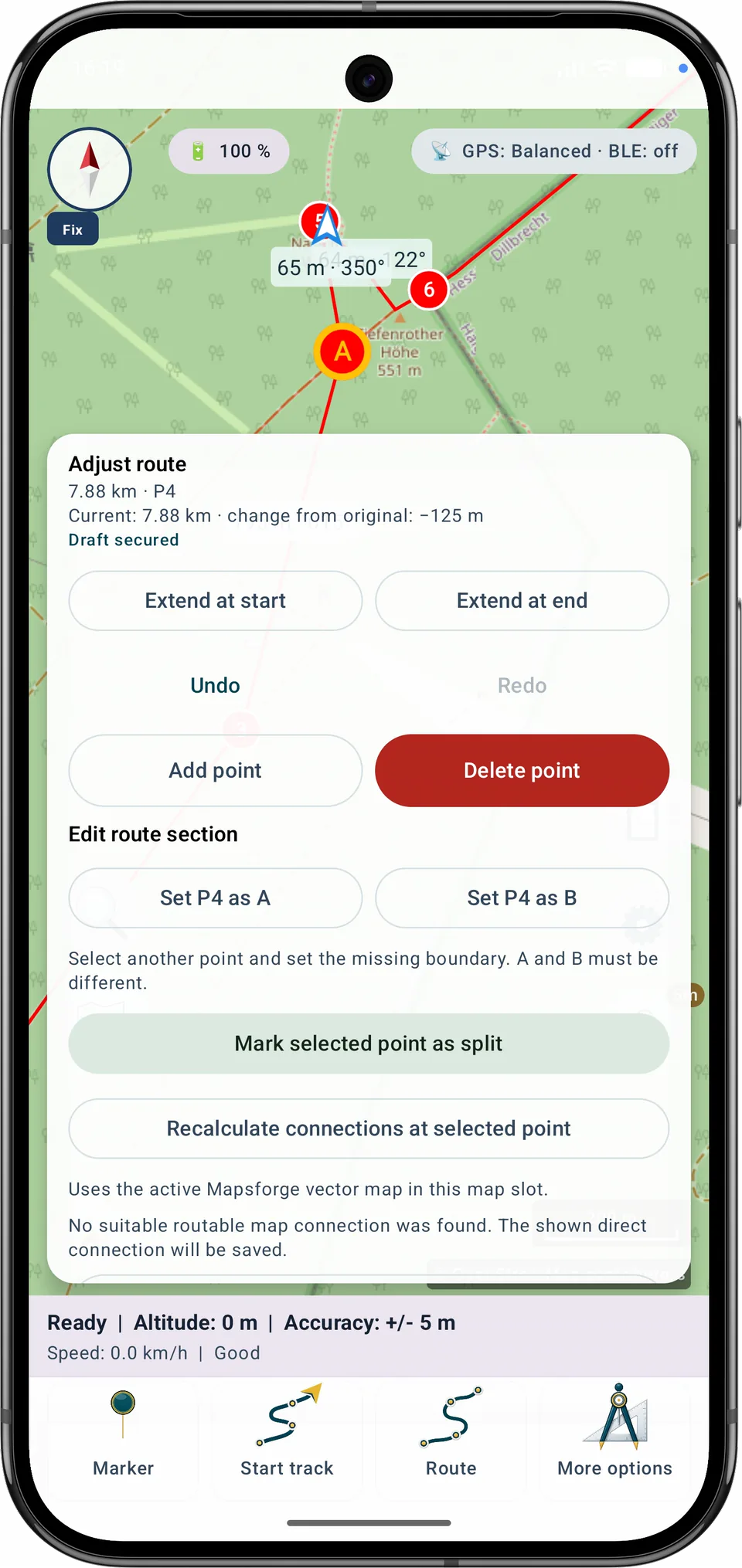
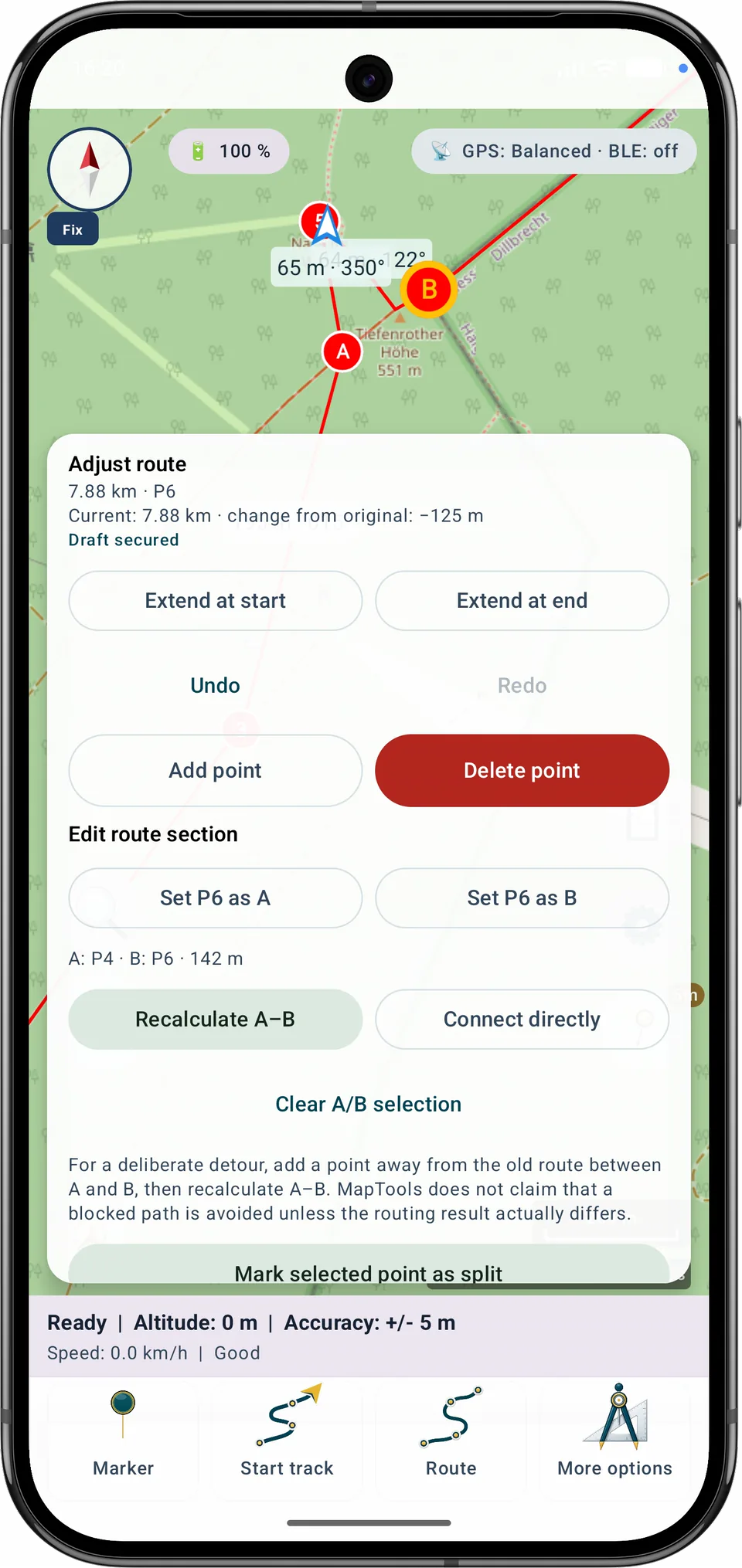
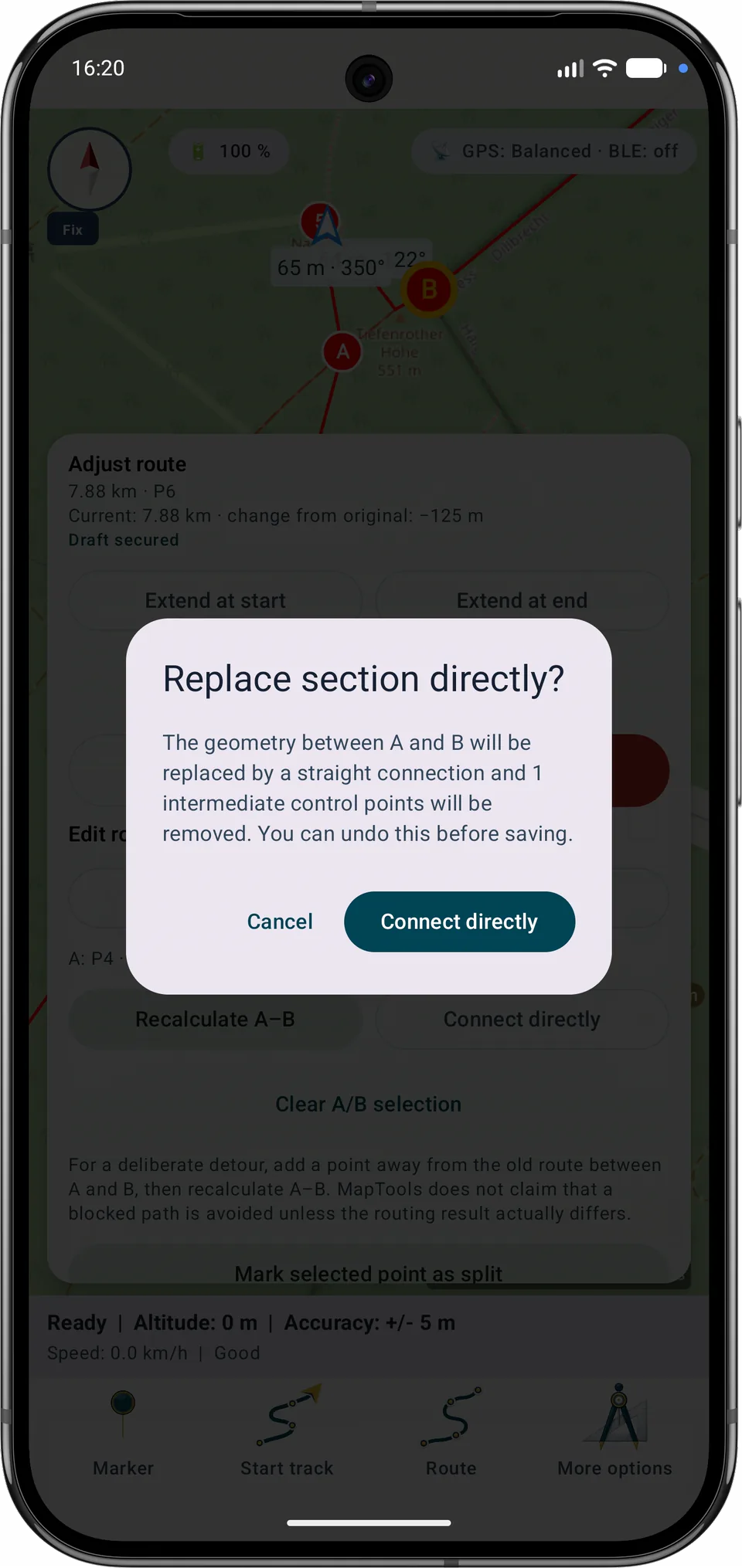
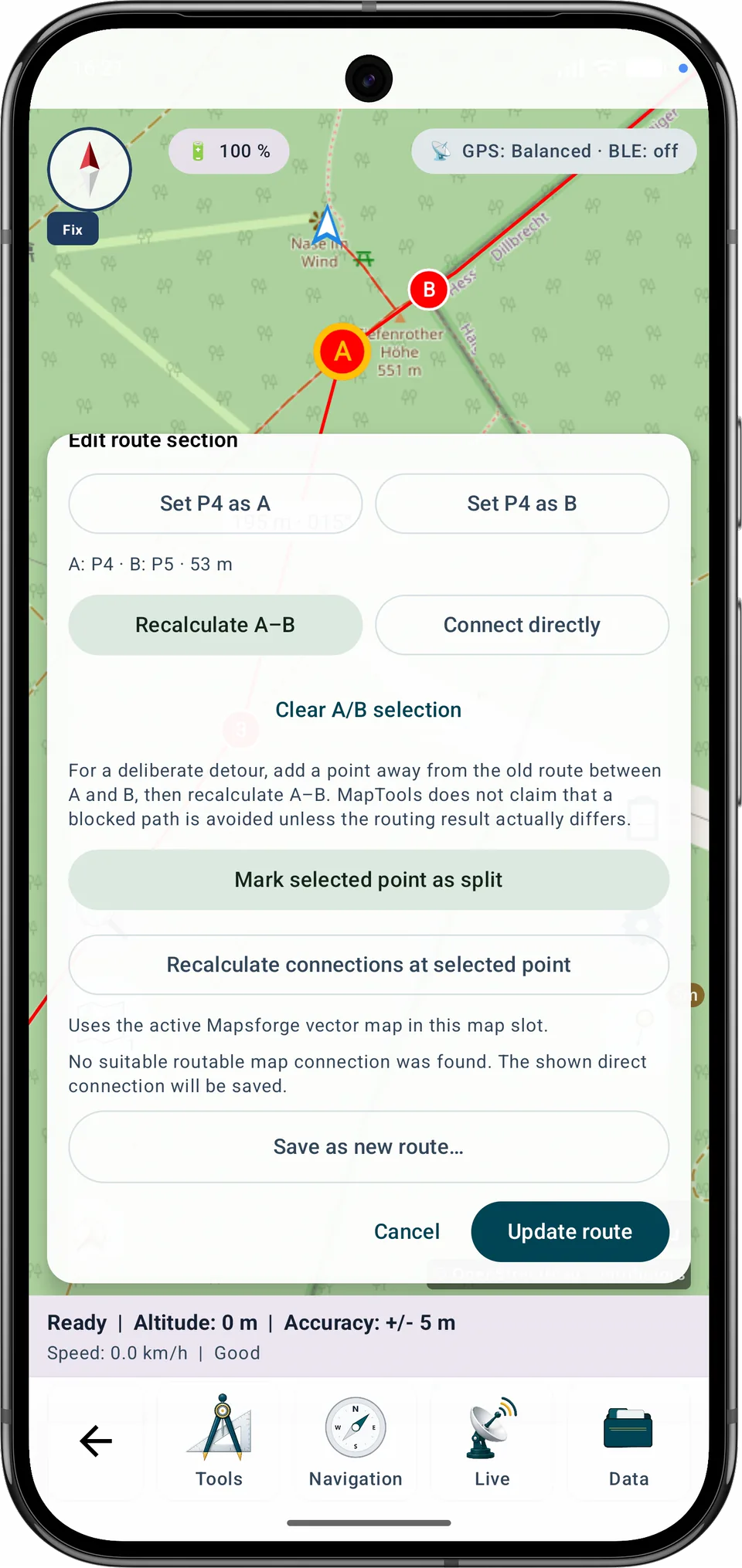
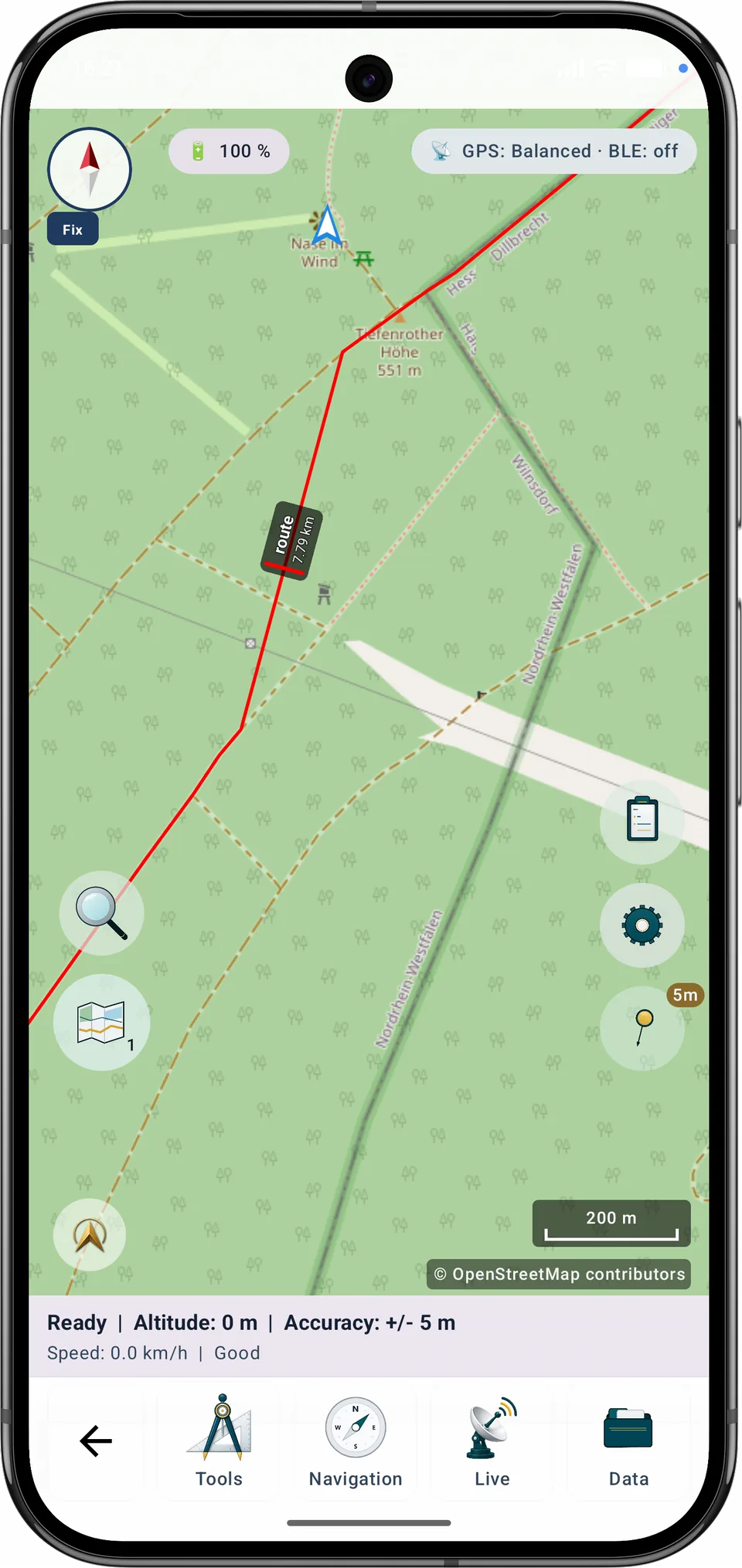
تستخدم عملية إعادة حساب A–B خريطة المتجهات المحلية النشطة والمتوافقة Mapsforge. إذا لم يتم العثور على مسار مناسب، فلن يقوم MapTools باستبدال القسم بخط مباشر بصمت.
دليل خطوة بخطوة
قم بتمييز نقطة تحكم مرقمة واحدة أو أكثر كنقاط تقسيم، وراجع أسماء المراحل الناتجة ونطاقات النقاط، ثم احفظ المراحل. يبقى المسار الأصلي دون تغيير.
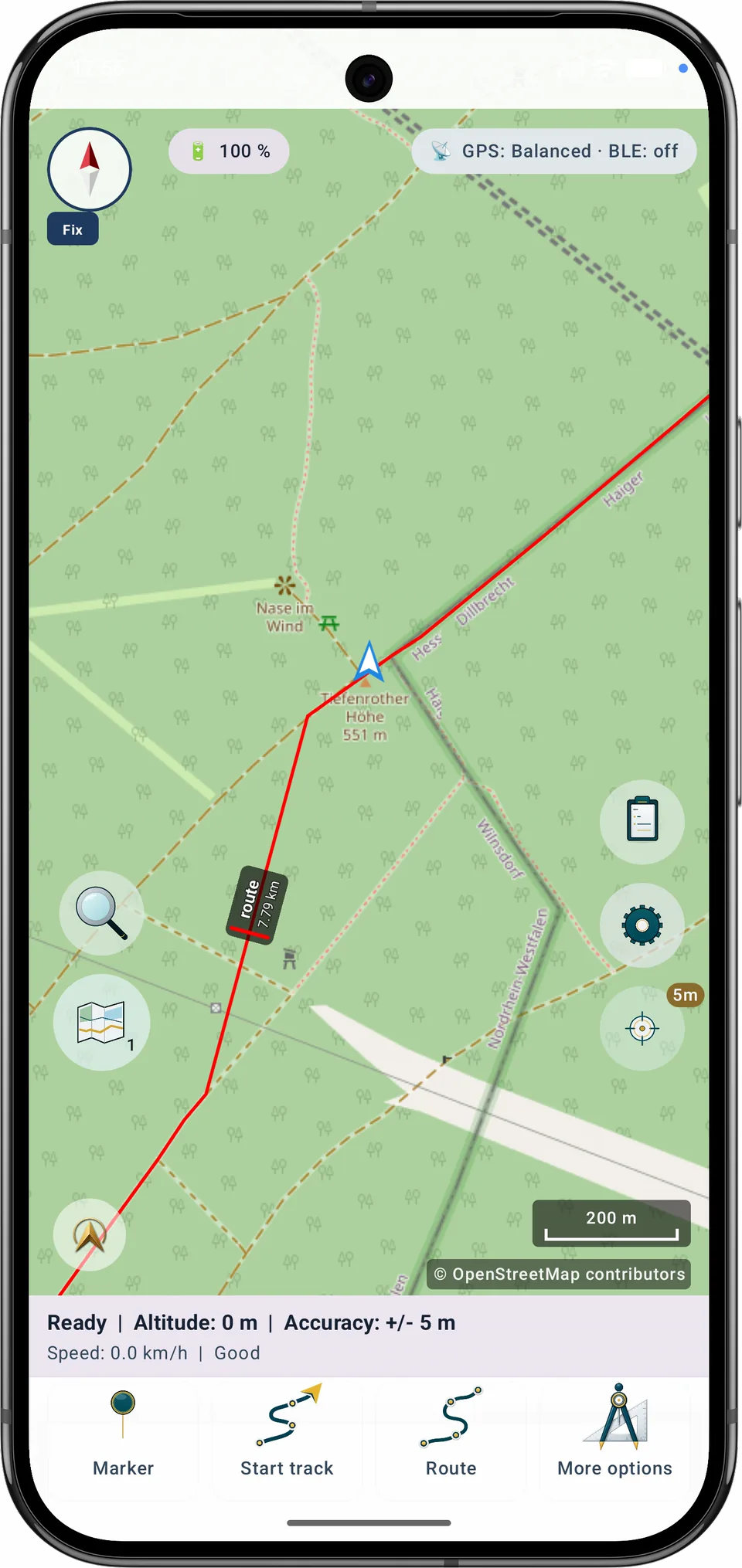
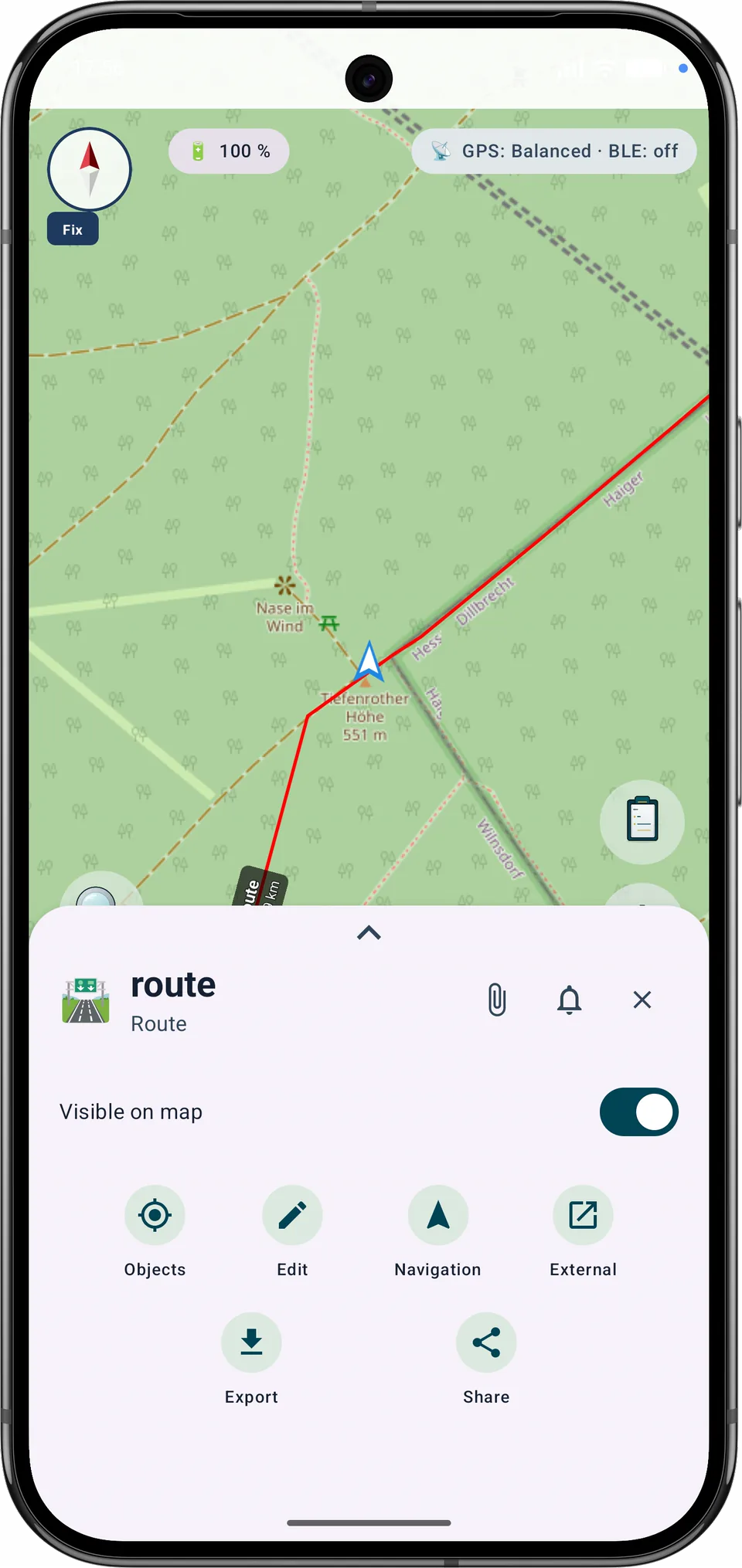
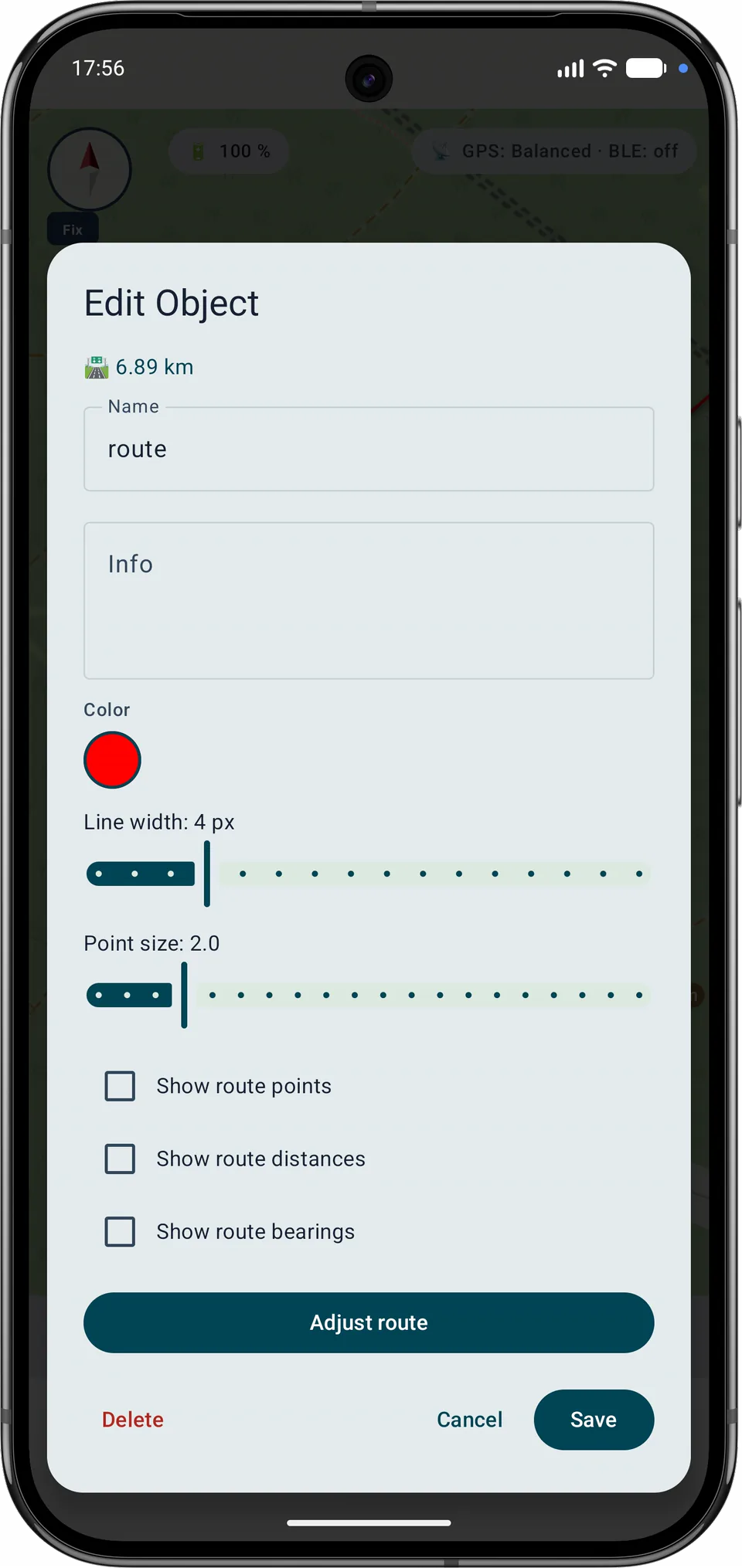
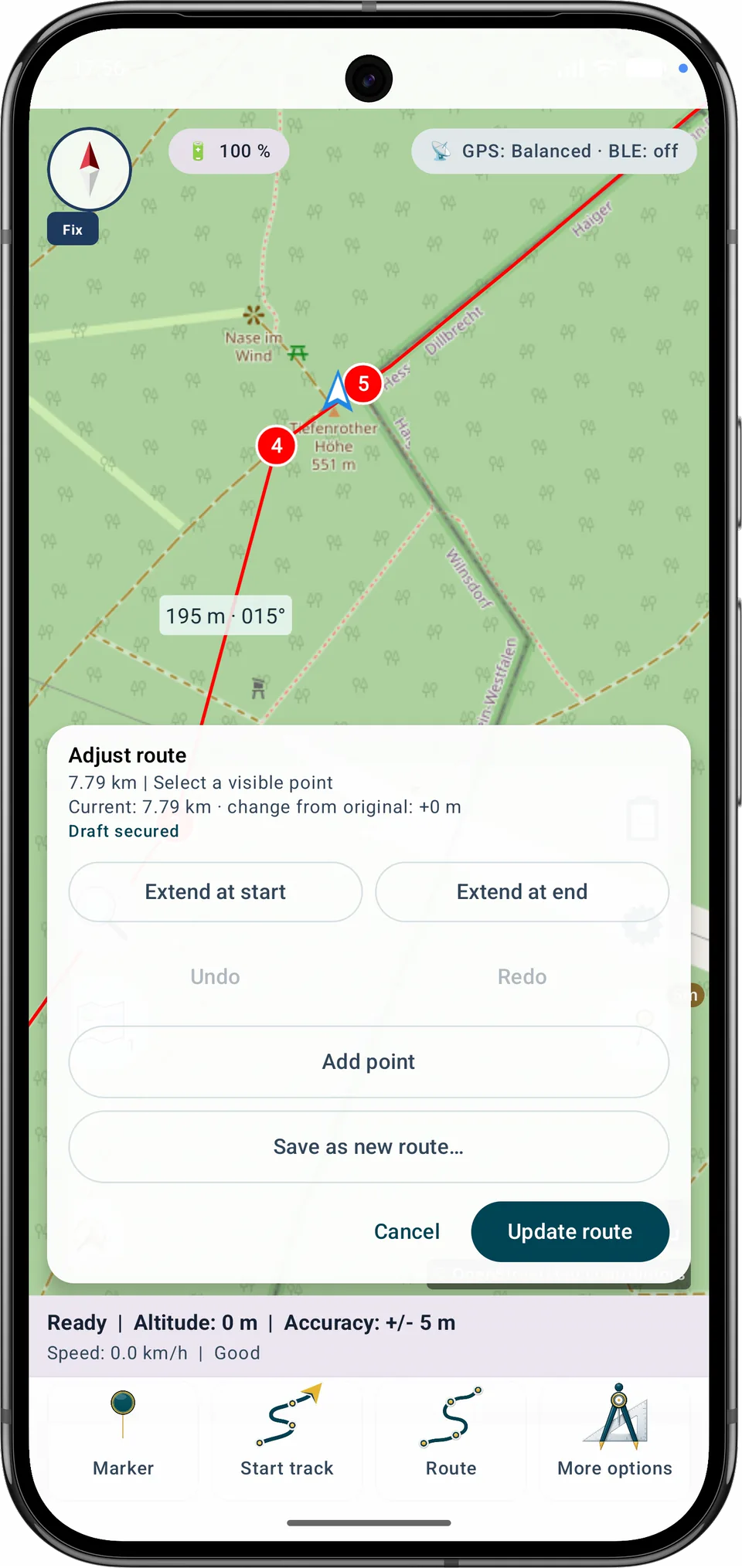
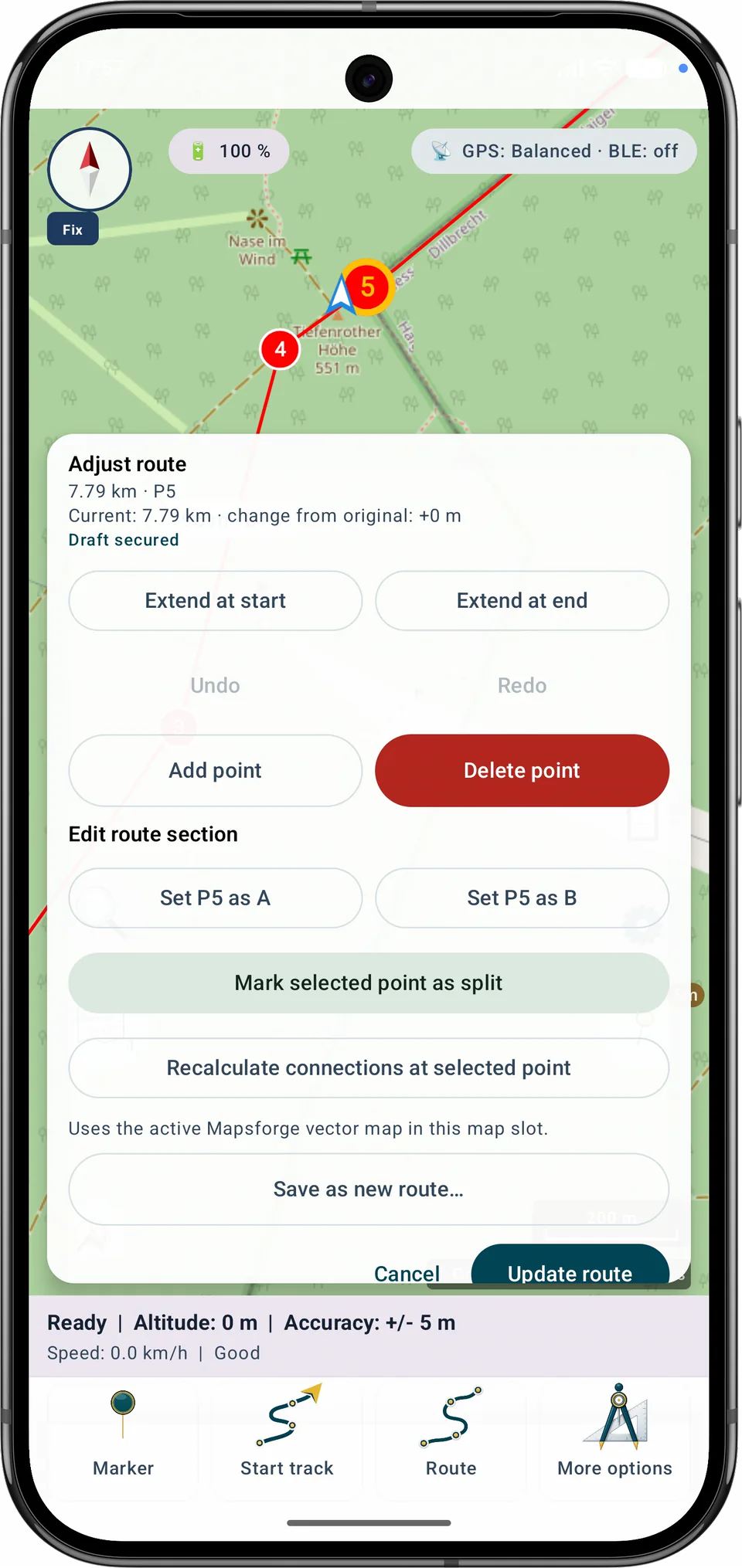
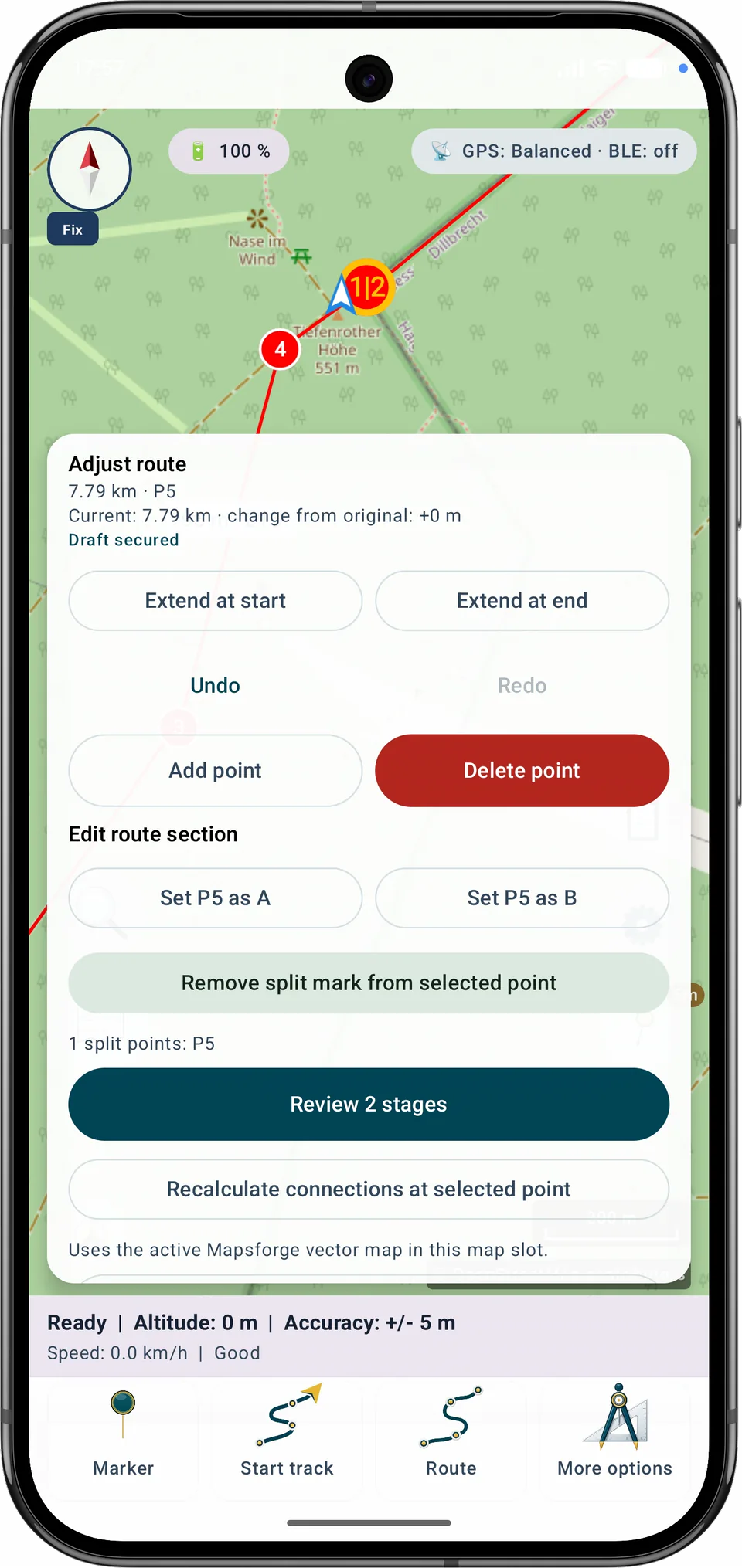
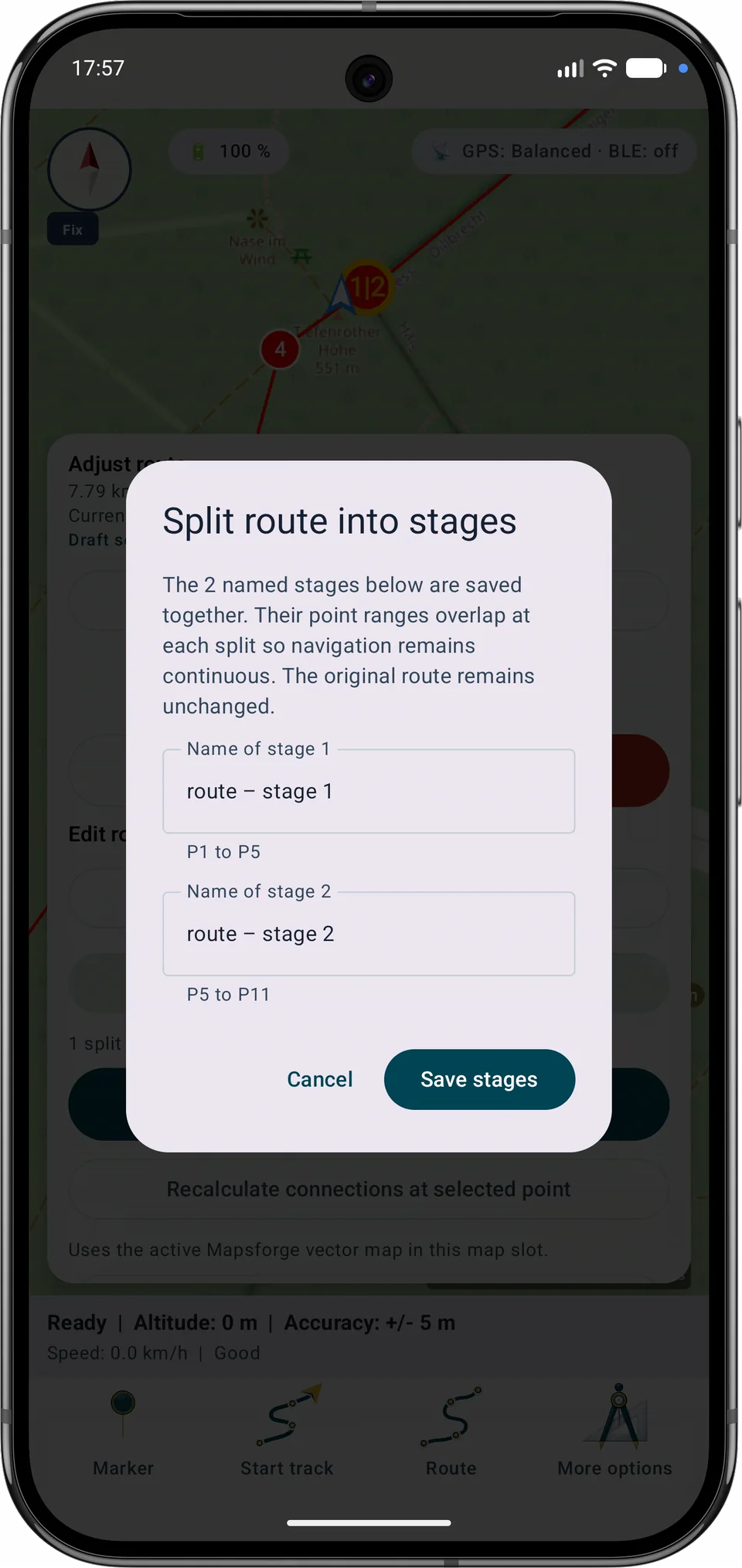
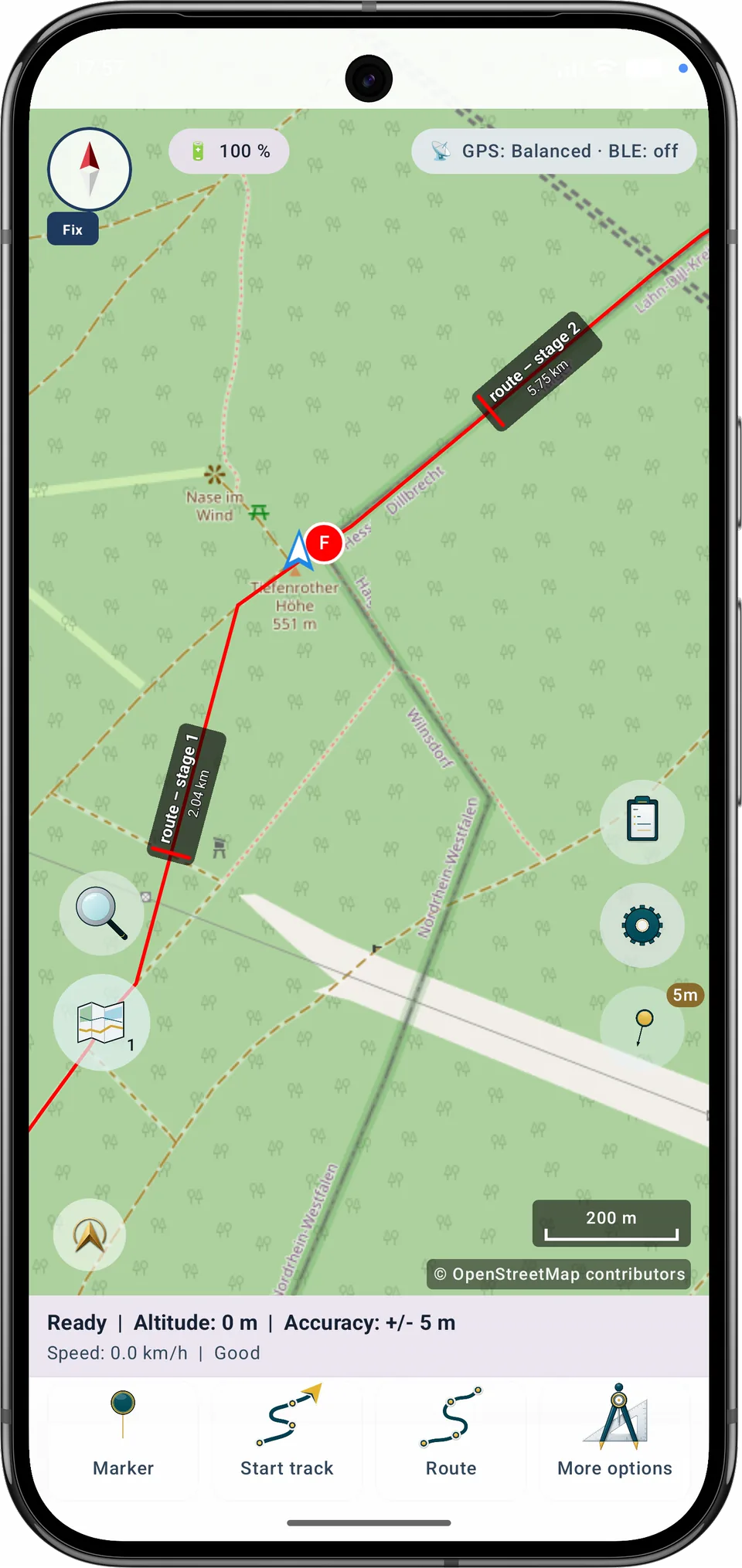
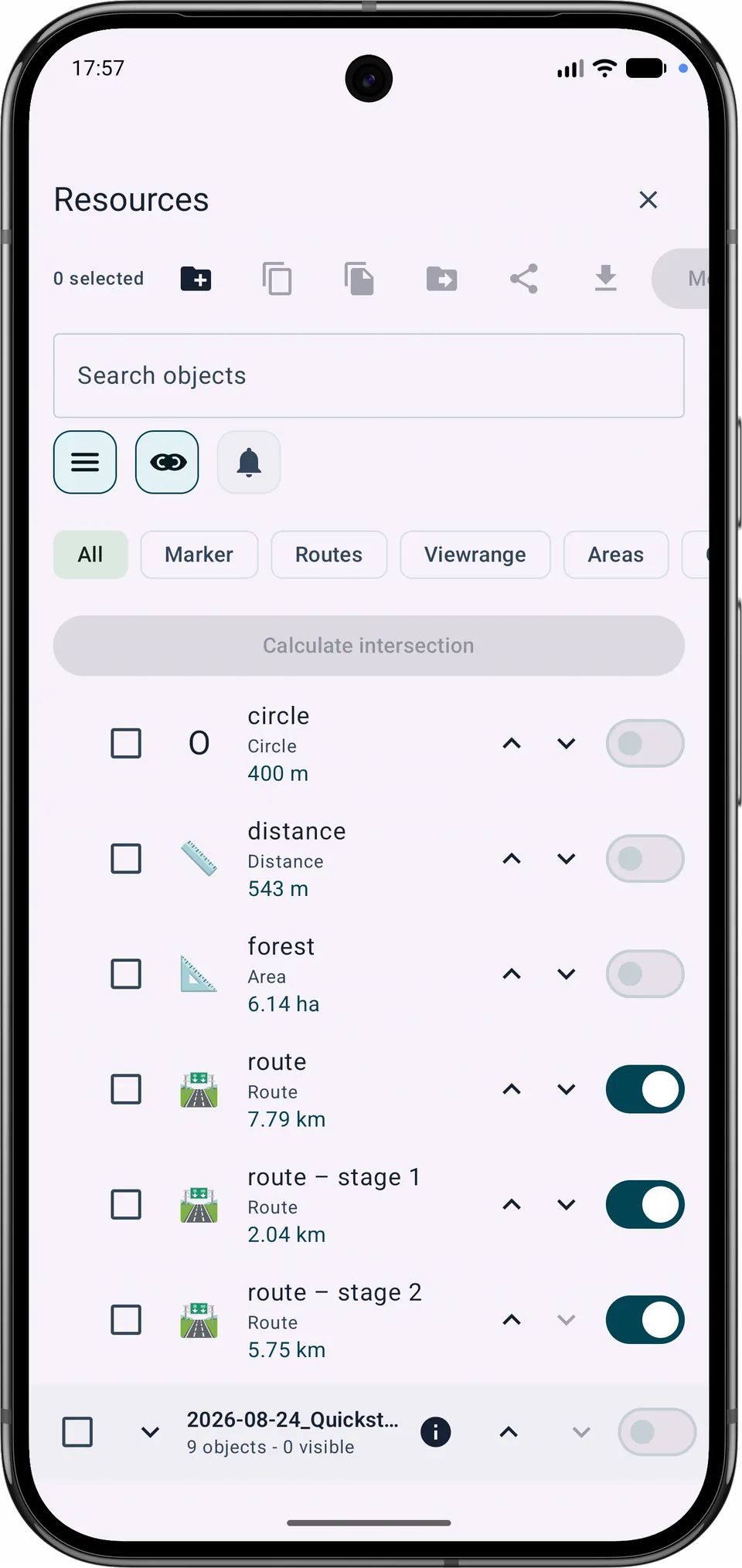
تتداخل المراحل المتجاورة عند نقطة الانقسام المشتركة بحيث يظل التنقل مستمرًا. تصبح كل مرحلة محفوظة كائن مسار منفصل بينما يتم الاحتفاظ بالمسار الأصلي.
الوظيفة الحالية
الخريطة الأساسية المعروضة ومصدر التوجيه غير المتصل منفصلان. يمكن تحديد خريطة Mapsforge محلية مناسبة للتوجيه التلقائي حتى أثناء عرض Google أو OSM. تظل مسارات GPX المستوردة مرئية بشكل فردي، ويمكن التحكم فيها وقابليتها للإزالة.
Free وPro
تتوفر إعادة تخطيط قسم بين A وB أو تحديث مسار أو حفظ متغير جديد ضمن حدود مسار Free في Free. يتطلب دمج مسارات متعددة وتقسيم المسار إلى مراحل Pro.
التنقل ← التسجيل يحتوي على وضع التسجيل وعناصر التحكم لبدء المسار وإيقافه مؤقتًا واستئنافه وإيقافه. عند التوقف، قم بتحرير الاسم المقترح وحفظه، أو اختر الإنهاء دون الحفظ. التجاهل يتطلب التأكيد. يتم طلب الأذونات عند بدء التسجيل.
حفظ وإنهاء · إنهاء بدون حفظ · متابعة التسجيل
سيتم تجاهل التسجيل. سيتم الاحتفاظ بالعلامات والصور والملاحظات الصوتية الموجودة.
تعرض تفاصيل الجولة المسار والتسجيل بشكل منفصل، مع متوسط السرعة والوتيرة وإحصائيات الحركة المقدرة بشكل واضح. القيم المفقودة لا تزال مجهولة. تتوفر إجراءات الصور والصوت في لوحة تفاصيل الجولة المفتوحة. يستخدم المتوسط والوتيرة في شريط الخريطة مدة التسجيل الكاملة، بما في ذلك التوقفات المؤقتة والفجوات GPS. القيم المتحركة هي تقديرات من أقسام GPS المسجلة. لا يتم تأكيد المواقف المفقودة مؤقتًا. تم تنعيم الحد الأقصى؛ تظهر القيم غير المتوفرة شرطة. السرعة هي الوقت لكل كيلومتر أو ميل.
يضع ملف التعريف القياسي بطاقة التسجيل المدمجة في الأعلى بين البوصلة والحالة. يضع ملف تعريف المشي لمسافات طويلة قيم الجولة أعلى القائمة السفلية. انقر لفتح تفاصيل الجولة، بما في ذلك الكاميرا والميكروفون. يظل إغلاق X أعلى المحتوى القابل للتمرير.
يعرض «إظهار على الخريطة» المسار المختار ونقاطه مؤقتًا، حتى إن كانت مخفية عادةً. تتوقف متابعة موقع GPS مؤقتًا. يعيد الرجوع العرض والظهور السابقين.
اختر مسارًا محفوظًا وابدأ الإرشاد. يكون التسجيل معطلًا عند كل بدء جديد؛ وفعّل «تسجيل المسار» إذا أردت. يغلق X والرجوع تفاصيل الإرشاد فقط. يفتح «إنهاء الملاحة» نافذة تأكيد يمكنك فيها أيضًا إنهاء التسجيل وحفظه.
تُستأنف الخريطة والأنشطة الجارية بصورة أكثر موثوقية بعد الانقطاعات. لا تُضاف نقاط GPS المفقودة لاحقًا.
تصحيح المسار المحفوظ الأخير
اضغط على المسار، أو استخدم الوقت، أو حدد نقطة من القائمة. ستتم إزالة القسم الصامت.
اختر نقطة النهاية الجديدة
نظرة عامة على المسار. استخدم قائمة النقاط أو عناصر التحكم في الوقت لتحديد دقيق يمكن الوصول إليه.
قرب بداية المسار · بالقرب من نهاية المسار · لا توجد معلومات عن الوقت
اضغط على المسار، أو استخدم الوقت، أو حدد نقطة من القائمة. ستتم إزالة القسم الصامت.
- ... دقيقة
النقاط المحذوفة: … · الأقسام المتأثرة: …
وسائل الإعلام بعد النهاية الجديدة: … صور، … ملاحظات، … تسجيلات صوتية. تبقى وسائل الإعلام في المشروع.
اسم النسخة المصححة
الأصل مرتبط بشبكة بحث. احفظ نسخة مصححة بدلاً من ذلك.
سيتم اختصار الشكل الهندسي الأصلي إلى النقطة المحددة. يمكنك استعادة الإصدار السابق مرة واحدة، ما لم يتم تحرير المسار مرة أخرى.
استعادة النسخة قبل التصحيح
المسار يفتح عناصر التحكم في التسجيل. يتطلب التشغيل والإيقاف الضغط لفترة طويلة حتى يمتلئ مؤشر التقدم، يليه تأكيد.
يفتح الطريق إنشاء المسار وتحريره واختياره. يستخدم إنهاء التوجيه النشط نفس الضغط المطول والتأكيد المتعمد مثل تسجيل المسار.
يتم استخدام الأصل حاليًا للملاحة. أوقف التنقل أو احفظ نسخة.
تسجيل الملف الشخصي
التنقل ← التسجيل يحتوي على وضع التسجيل وعناصر التحكم لبدء المسار وإيقافه مؤقتًا واستئنافه وإيقافه. عند التوقف، قم بتحرير الاسم المقترح وحفظه، أو اختر الإنهاء دون الحفظ. التجاهل يتطلب التأكيد. يتم طلب الأذونات عند بدء التسجيل.
تسجيل ملاحظة صوتية ذات علامات جغرافية
مطلوب الموقع الحالي لالتقاط سريع.
كل تسجيل ينتمي إلى جلسته الخاصة. بعد انقطاع، يقوم MapTools بإلحاق ذيل دفتر اليومية المفقود فقط؛ تظل فترات التوقف المؤقت عبارة عن مقاطع مسار منفصلة على الخريطة وفي .asmaps والنسخ الاحتياطية وGPX.
تقوم لقطات الاسترداد التلقائي بتخزين أعمال المشروع الجارية محليًا. أنها لا تحل محل نسخة احتياطية كاملة يدوية.
يبدأ الوضع التلقائي بدقة عالية، ثم يختار ملف GPS وفقًا للتوجيه على المسار والحركة ووضع Eco ومستوى البطارية. تمنع خاصية الهسترة التبديل المتكرر.
القيم: الحد الأدنى من الوقت · الحد الأدنى من الحركة · الحد الأقصى المقبول لعدم الدقة.
اعتمادًا على اختيار التصدير، يتم تضمين الصور وملفات PDF والملاحظات الصوتية الخاصة بالمشروع أو الكائنات المحددة في ملف المشروع.
يمكن أن تحتوي المرفقات على صور خاصة ومستندات وأصوات وبيانات تعريفية للموقع. تضمينها فقط عمدا.
كل تسجيل ينتمي إلى جلسته الخاصة. بعد انقطاع، يقوم MapTools بإلحاق ذيل دفتر اليومية المفقود فقط؛ تظل فترات التوقف المؤقت عبارة عن مقاطع مسار منفصلة على الخريطة وفي .asmaps والنسخ الاحتياطية وGPX.